> ## Documentation Index
> Fetch the complete documentation index at: https://docs.246club.xyz/llms.txt
> Use this file to discover all available pages before exploring further.
# 246 Club Exit Guide
> Withdraw 246 Club positions directly onchain with the complete block explorer walkthrough.
246Club is sunsetting. This guide walks you through withdrawing your positions directly on-chain using Etherscan, Sonicscan, or your chain's block explorer.
**Diamond246 Contract:** `0x2460a05cC7C9e0f1e20B9b98C6F54aCaad221b98` (same address on all chains)
> The contract is verified on all chains. Since it uses the **Diamond proxy pattern (EIP-2535)**, you'll interact with it through the special "Diamond Proxy" tab on the block explorer.
***
## Block Explorer Links
| Chain | Diamond246 Link |
| -------- | ------------------------------------------------------------------------------------------------------ |
| Ethereum | [View on Etherscan](https://etherscan.io/address/0x2460a05cC7C9e0f1e20B9b98C6F54aCaad221b98) |
| Sonic | [View on Sonicscan](https://sonicscan.org/address/0x2460a05cC7C9e0f1e20B9b98C6F54aCaad221b98) |
| Plasma | [View on Plasmascan](https://testnet.plasmascan.io/address/0x2460a05cC7C9e0f1e20B9b98C6F54aCaad221b98) |
***
## Navigating the Diamond Proxy on Etherscan
Diamond proxy contracts have a special **"Diamond Proxy"** button on the block explorer. This is different from the regular "Read/Write as Proxy" tabs.
### How to access Diamond Proxy functions
1. Go to the Diamond246 contract page
2. Click the **"Contract"** tab
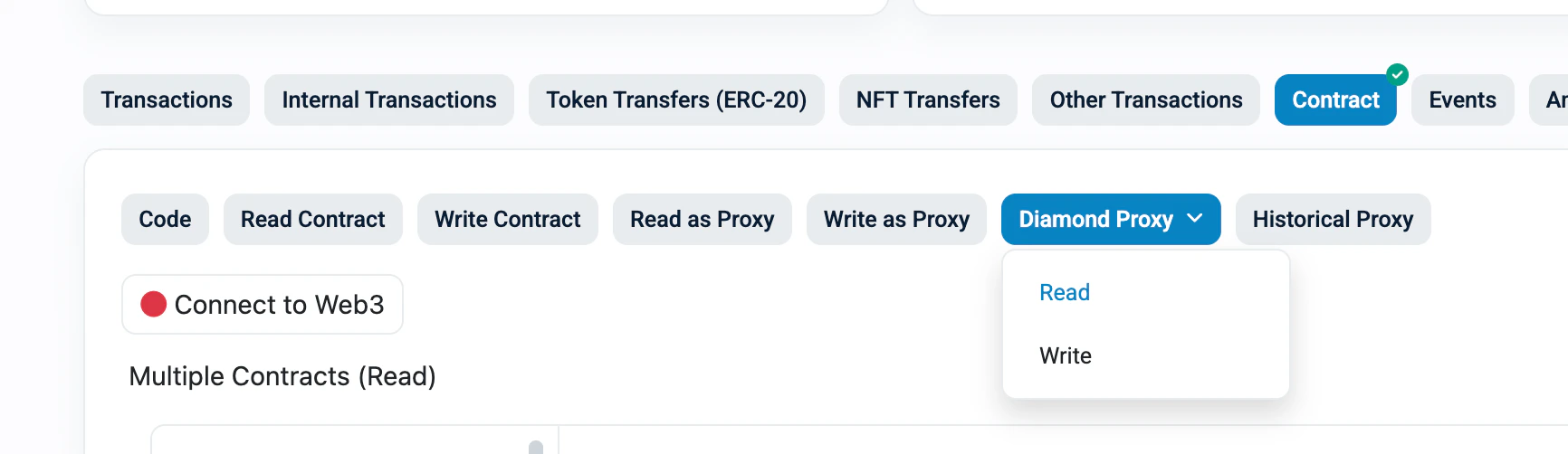
3. You'll see several sub-tabs — find the **"Diamond Proxy"** button (highlighted in blue)
4. Click it to reveal a dropdown with **Read** and **Write**
*The "Diamond Proxy" dropdown showing Read and Write options:*
 ### Reading data (Diamond Proxy > Read)
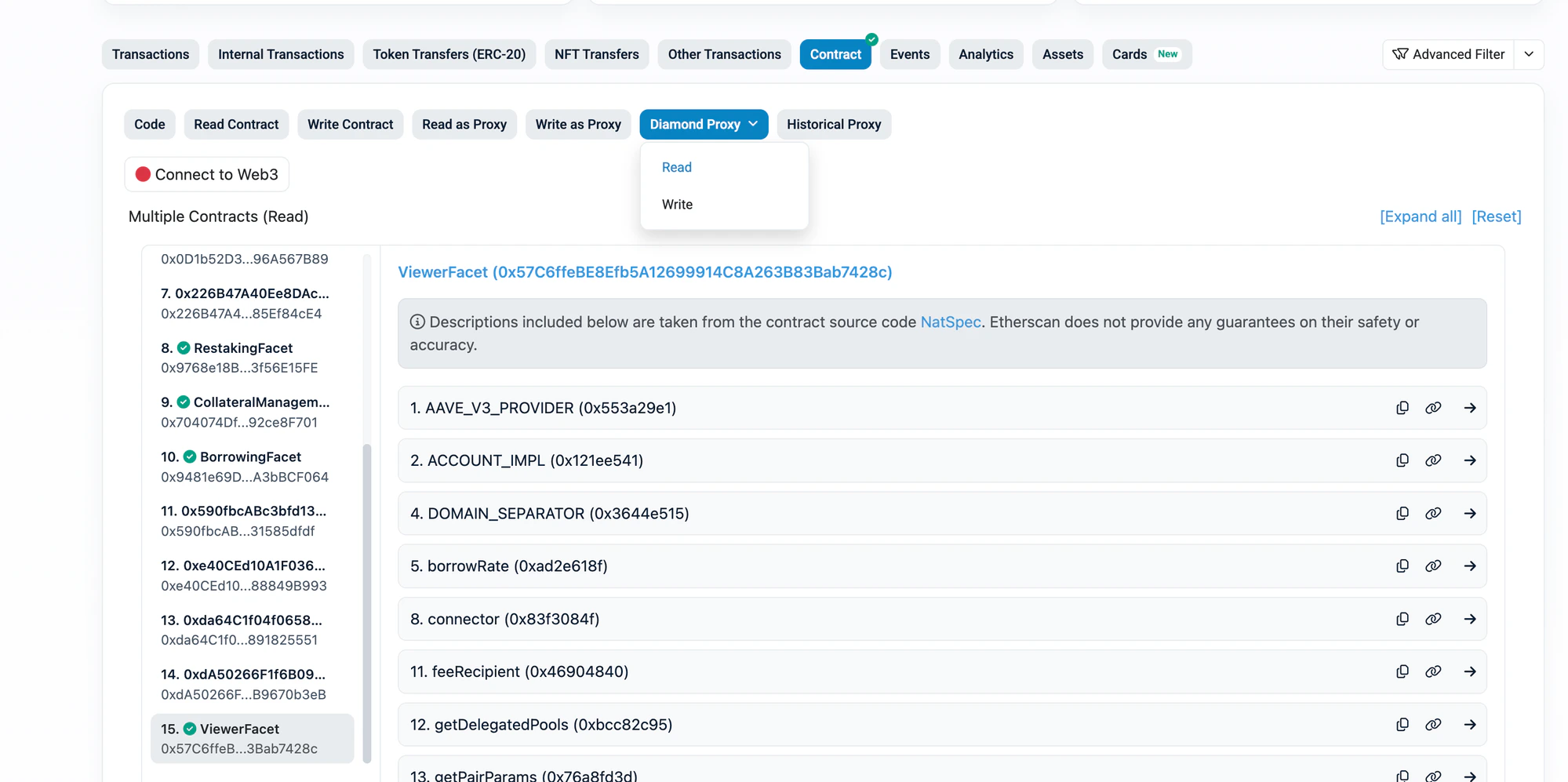
1. Click **"Diamond Proxy"** > **"Read"**
2. On the left sidebar, you'll see a list of all facets (numbered). Click **ViewerFacet** for `positions`, `restakers`, `pairs`, and other read functions
3. The right side shows all functions in that facet
*Diamond Proxy Read view — ViewerFacet selected in the left sidebar, showing functions like `positions` and `pairs`:*
### Reading data (Diamond Proxy > Read)
1. Click **"Diamond Proxy"** > **"Read"**
2. On the left sidebar, you'll see a list of all facets (numbered). Click **ViewerFacet** for `positions`, `restakers`, `pairs`, and other read functions
3. The right side shows all functions in that facet
*Diamond Proxy Read view — ViewerFacet selected in the left sidebar, showing functions like `positions` and `pairs`:*
 ### Writing transactions (Diamond Proxy > Write)
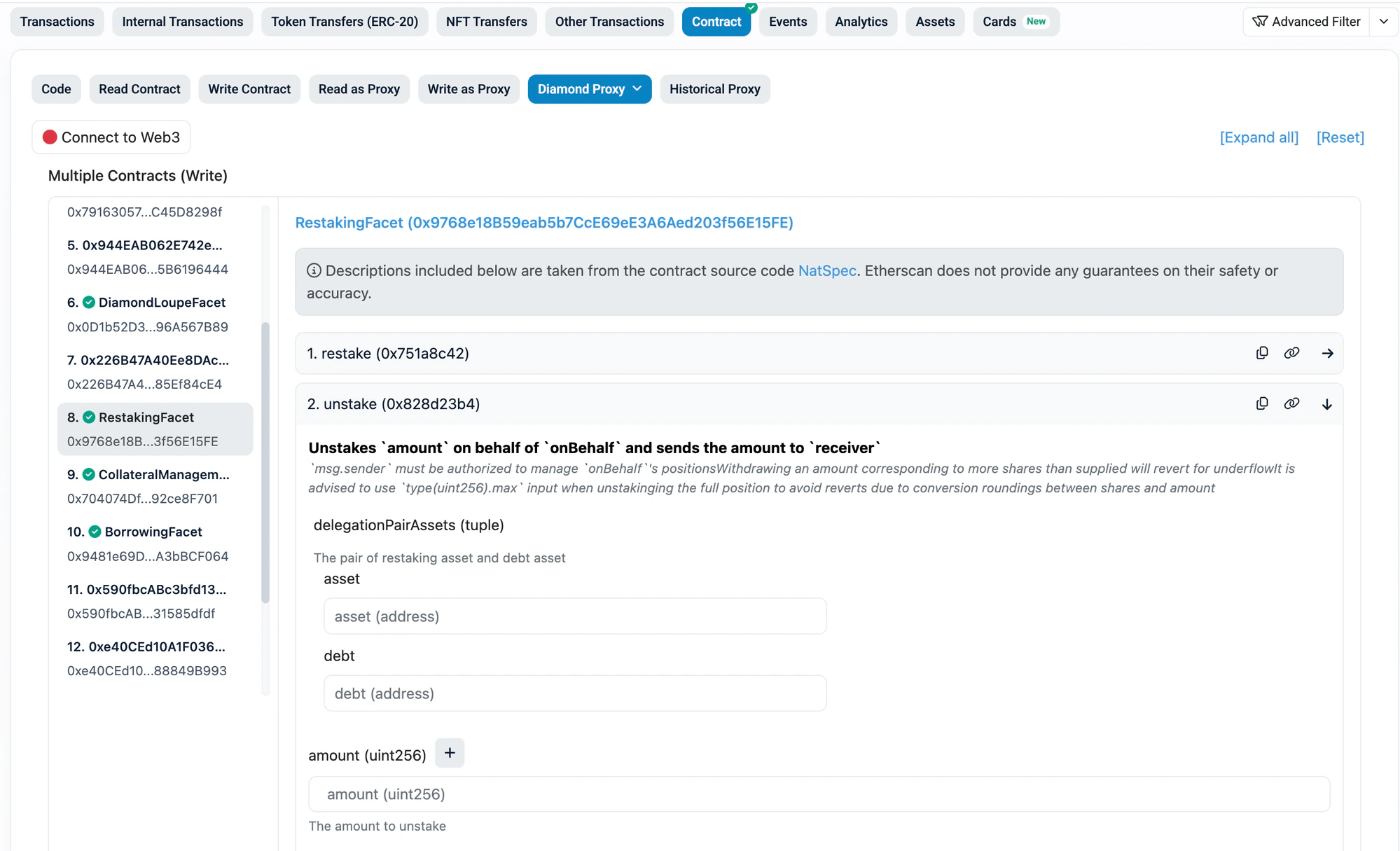
1. Click **"Diamond Proxy"** > **"Write"**
2. Click **"Connect to Web3"** to connect your wallet
3. On the left sidebar, select the correct facet:
| Action | Facet to select |
| ------------------- | ----------------------------- |
| Unstake | **RestakingFacet** |
| Repay | **BorrowingFacet** |
| Withdraw Collateral | **CollateralManagementFacet** |
*Diamond Proxy Write view — RestakingFacet selected in sidebar, showing `unstake` function with input fields:*
### Writing transactions (Diamond Proxy > Write)
1. Click **"Diamond Proxy"** > **"Write"**
2. Click **"Connect to Web3"** to connect your wallet
3. On the left sidebar, select the correct facet:
| Action | Facet to select |
| ------------------- | ----------------------------- |
| Unstake | **RestakingFacet** |
| Repay | **BorrowingFacet** |
| Withdraw Collateral | **CollateralManagementFacet** |
*Diamond Proxy Write view — RestakingFacet selected in sidebar, showing `unstake` function with input fields:*
 > **Tip:** If you don't see the function you need, you're on the wrong facet in the sidebar. Check the table above and click the correct facet name.
***
## 1. Find Your Pair ID
Every operation requires a **delegationPairId** (for restake positions) or **pairId** (for borrow positions). Find yours from the tables below.
### Ethereum — Restake Pools
| Asset (aToken) | Underlying | Debt | delegationPairId |
| -------------- | ---------- | ---- | -------------------------------------------------------------------- |
| aEthUSDC | USDC | GHO | `0x858e80a896e0b166bb915cf23a5422af84da3bd03ba15266bf657e202a706709` |
| aEthUSDC | USDC | USDC | `0x6f8227c2f15c13d9c9d409c165322ea1fa7815b464a83bb3db97196f6b547acf` |
| aEthWETH | WETH | WETH | `0xc95ddaa41f8b052609186ef95d959eeed8e9442460735d56ccc5f2fb9c8c6459` |
### Ethereum — Borrow Pairs
| Collateral | Debt | pairId |
| ---------- | ---- | -------------------------------------------------------------------- |
| hyperUSDC | GHO | `0xc63f980a8c707b1fa3bd5d224ebb1e39461f918075af70e877e650cf165bcdd0` |
| hyperUSDC | USDC | `0x138691662b8b1b8ab563fe6dc02886254c7042e59b92da0c4e39b0a9a0676031` |
| fUSDC | GHO | `0x298aa6a6ed3c11386efa88a86ddd1aab2f5538ef87265e78ca04203d235da369` |
| fUSDC | USDC | `0x75af9116d0ec9cb02b0b105eaf57be84e3881668cf2cd2061652e5ad35100035` |
| bbqUSDC | GHO | `0x24263bb59f68725cc3009fbe60ef2defd3ef2115f90ea177ac8a988a034e77df` |
| bbqUSDC | USDC | `0x784ef0cb8b003a2560dc075d1aa0ad1f2b77c7fb25592ba49e307c1b5f24a32d` |
| resolvUSDC | GHO | `0x59b976403b0f22232c3c51de092212bb1c8f19deae389c245dd64209ad8bb693` |
| resolvUSDC | USDC | `0xdb9e632142599e0944d6abbd2f12403978125767a6ebaa11c76c5d6deac8b094` |
| USUALUSDC+ | GHO | `0x01c0ae13c65f5acd29a9b2965839d60a64db3ddf5021166eeefbdcd47790eb4c` |
| USUALUSDC+ | USDC | `0x7ea859e1663ec352f486242a1a6d3b3e49a7f0adbebd3db91c165c3ae9ceeb48` |
| Re7WETH | WETH | `0x4d0d8032c93ce906c251320ddfc684ab1f21d72dfecac3b7895d12aa7927a5cf` |
| mhyETH | WETH | `0x6a2ac2068deeddb301734d68d860d22d7c6d52d082c69385346cabc310bb8ff8` |
| gtLRTcore | WETH | `0x27b55ecdf7c08e7334dedd57b2d003f1632f659e985257c0e55f878afb50bca7` |
### Sonic — Restake Pools
| Asset (aToken) | Underlying | Debt | delegationPairId |
| -------------- | ---------- | ------ | -------------------------------------------------------------------- |
| aSonUSDC | USDC.e | USDC.e | `0x4372989400a74c4ee7194806b73722505de0f06b22d6b210e022b5fac29eb641` |
### Sonic — Borrow Pairs
| Collateral | Debt | pairId |
| ---------- | ------ | -------------------------------------------------------------------- |
| wstkscUSD | USDC.e | `0xeb88af7ca2a4b64c65951fd2fa1b6c0ea571ff03de0da61edd4ef1c2421573ba` |
### Plasma — Restake Pools
| Asset (aToken) | Underlying | Debt | delegationPairId |
| -------------- | ---------- | ----- | -------------------------------------------------------------------- |
| aPlaUSDT0 | USDT0 | USDT0 | `0x060ffdf07a3de1f85184e3996ffd480d811e95ea141404370b48f81d154f91bd` |
### Plasma — Borrow Pairs
| Collateral | Debt | pairId |
| ------------ | ----- | -------------------------------------------------------------------- |
| 246USDT0 | USDT0 | `0x7830cec2536e7ccb563a576b0b0837a87e7d245bd40583d247697c272f1d1dc3` |
| Re7USDT0Core | USDT0 | `0x1562c1aede7b0d4f808fc1078b2b4a638c1202544a34900b7f978130f4a6db30` |
***
## 2. Check Your Positions
1. Go to the Diamond246 contract on the block explorer for your chain
2. Click **"Diamond Proxy"** > **"Read"**
3. In the left sidebar, click **"ViewerFacet"**
*ViewerFacet selected in sidebar — scroll down to find `positions` and `restakers` functions:*
> **Tip:** If you don't see the function you need, you're on the wrong facet in the sidebar. Check the table above and click the correct facet name.
***
## 1. Find Your Pair ID
Every operation requires a **delegationPairId** (for restake positions) or **pairId** (for borrow positions). Find yours from the tables below.
### Ethereum — Restake Pools
| Asset (aToken) | Underlying | Debt | delegationPairId |
| -------------- | ---------- | ---- | -------------------------------------------------------------------- |
| aEthUSDC | USDC | GHO | `0x858e80a896e0b166bb915cf23a5422af84da3bd03ba15266bf657e202a706709` |
| aEthUSDC | USDC | USDC | `0x6f8227c2f15c13d9c9d409c165322ea1fa7815b464a83bb3db97196f6b547acf` |
| aEthWETH | WETH | WETH | `0xc95ddaa41f8b052609186ef95d959eeed8e9442460735d56ccc5f2fb9c8c6459` |
### Ethereum — Borrow Pairs
| Collateral | Debt | pairId |
| ---------- | ---- | -------------------------------------------------------------------- |
| hyperUSDC | GHO | `0xc63f980a8c707b1fa3bd5d224ebb1e39461f918075af70e877e650cf165bcdd0` |
| hyperUSDC | USDC | `0x138691662b8b1b8ab563fe6dc02886254c7042e59b92da0c4e39b0a9a0676031` |
| fUSDC | GHO | `0x298aa6a6ed3c11386efa88a86ddd1aab2f5538ef87265e78ca04203d235da369` |
| fUSDC | USDC | `0x75af9116d0ec9cb02b0b105eaf57be84e3881668cf2cd2061652e5ad35100035` |
| bbqUSDC | GHO | `0x24263bb59f68725cc3009fbe60ef2defd3ef2115f90ea177ac8a988a034e77df` |
| bbqUSDC | USDC | `0x784ef0cb8b003a2560dc075d1aa0ad1f2b77c7fb25592ba49e307c1b5f24a32d` |
| resolvUSDC | GHO | `0x59b976403b0f22232c3c51de092212bb1c8f19deae389c245dd64209ad8bb693` |
| resolvUSDC | USDC | `0xdb9e632142599e0944d6abbd2f12403978125767a6ebaa11c76c5d6deac8b094` |
| USUALUSDC+ | GHO | `0x01c0ae13c65f5acd29a9b2965839d60a64db3ddf5021166eeefbdcd47790eb4c` |
| USUALUSDC+ | USDC | `0x7ea859e1663ec352f486242a1a6d3b3e49a7f0adbebd3db91c165c3ae9ceeb48` |
| Re7WETH | WETH | `0x4d0d8032c93ce906c251320ddfc684ab1f21d72dfecac3b7895d12aa7927a5cf` |
| mhyETH | WETH | `0x6a2ac2068deeddb301734d68d860d22d7c6d52d082c69385346cabc310bb8ff8` |
| gtLRTcore | WETH | `0x27b55ecdf7c08e7334dedd57b2d003f1632f659e985257c0e55f878afb50bca7` |
### Sonic — Restake Pools
| Asset (aToken) | Underlying | Debt | delegationPairId |
| -------------- | ---------- | ------ | -------------------------------------------------------------------- |
| aSonUSDC | USDC.e | USDC.e | `0x4372989400a74c4ee7194806b73722505de0f06b22d6b210e022b5fac29eb641` |
### Sonic — Borrow Pairs
| Collateral | Debt | pairId |
| ---------- | ------ | -------------------------------------------------------------------- |
| wstkscUSD | USDC.e | `0xeb88af7ca2a4b64c65951fd2fa1b6c0ea571ff03de0da61edd4ef1c2421573ba` |
### Plasma — Restake Pools
| Asset (aToken) | Underlying | Debt | delegationPairId |
| -------------- | ---------- | ----- | -------------------------------------------------------------------- |
| aPlaUSDT0 | USDT0 | USDT0 | `0x060ffdf07a3de1f85184e3996ffd480d811e95ea141404370b48f81d154f91bd` |
### Plasma — Borrow Pairs
| Collateral | Debt | pairId |
| ------------ | ----- | -------------------------------------------------------------------- |
| 246USDT0 | USDT0 | `0x7830cec2536e7ccb563a576b0b0837a87e7d245bd40583d247697c272f1d1dc3` |
| Re7USDT0Core | USDT0 | `0x1562c1aede7b0d4f808fc1078b2b4a638c1202544a34900b7f978130f4a6db30` |
***
## 2. Check Your Positions
1. Go to the Diamond246 contract on the block explorer for your chain
2. Click **"Diamond Proxy"** > **"Read"**
3. In the left sidebar, click **"ViewerFacet"**
*ViewerFacet selected in sidebar — scroll down to find `positions` and `restakers` functions:*
 ### Check Borrow Position
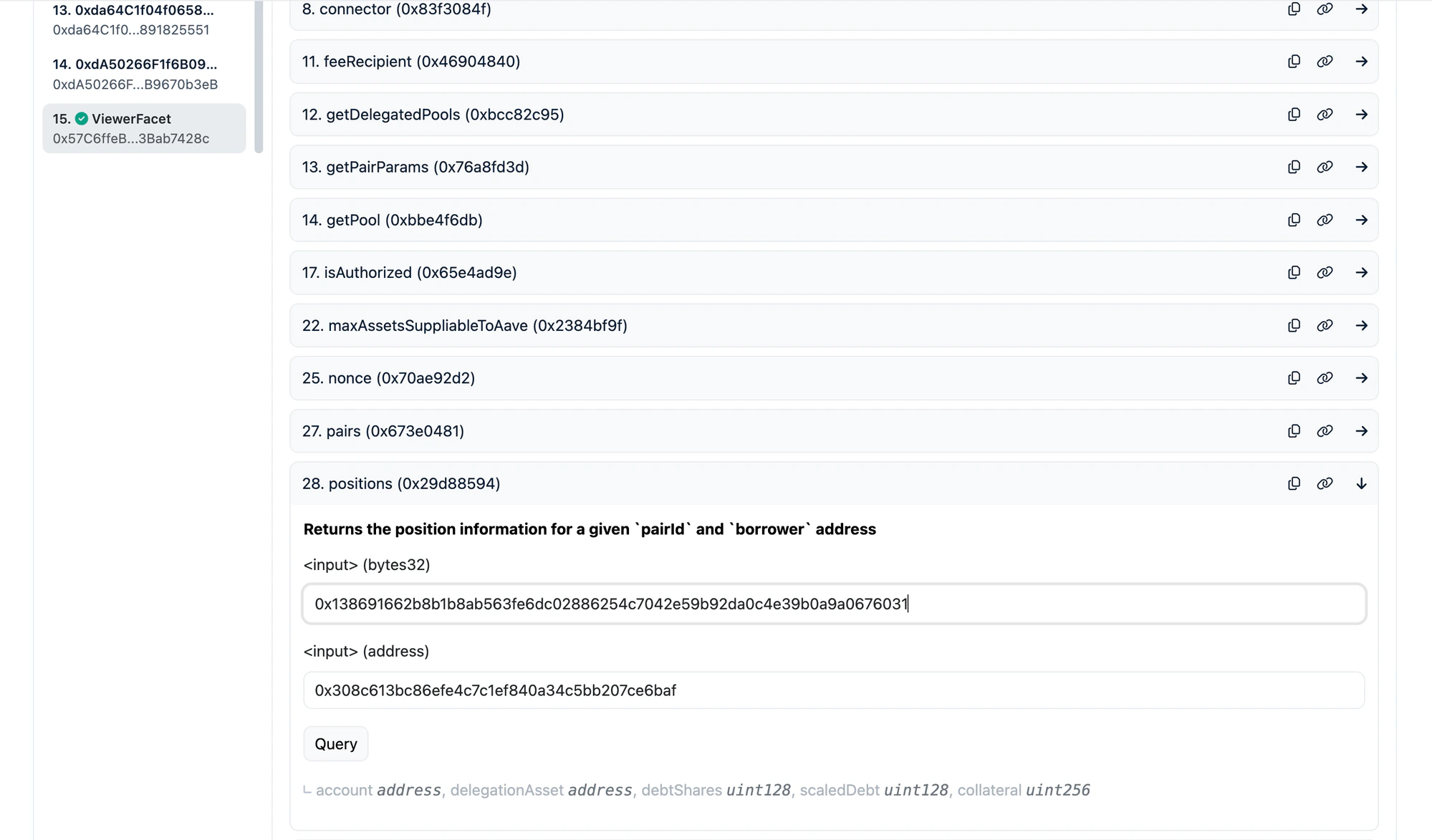
Find and expand the **`positions`** function.
| Parameter | What to enter |
| --------- | --------------------------------- |
| `pairId` | Your pair ID from the table above |
| `account` | Your wallet address |
Click **Query**. You will see:
| Field | Meaning |
| ------------ | ------------------------------------------------- |
| `account` | Your proxy account address (used internally) |
| `debtShares` | Your share of the debt pool |
| `collateral` | Your collateral amount (in token's smallest unit) |
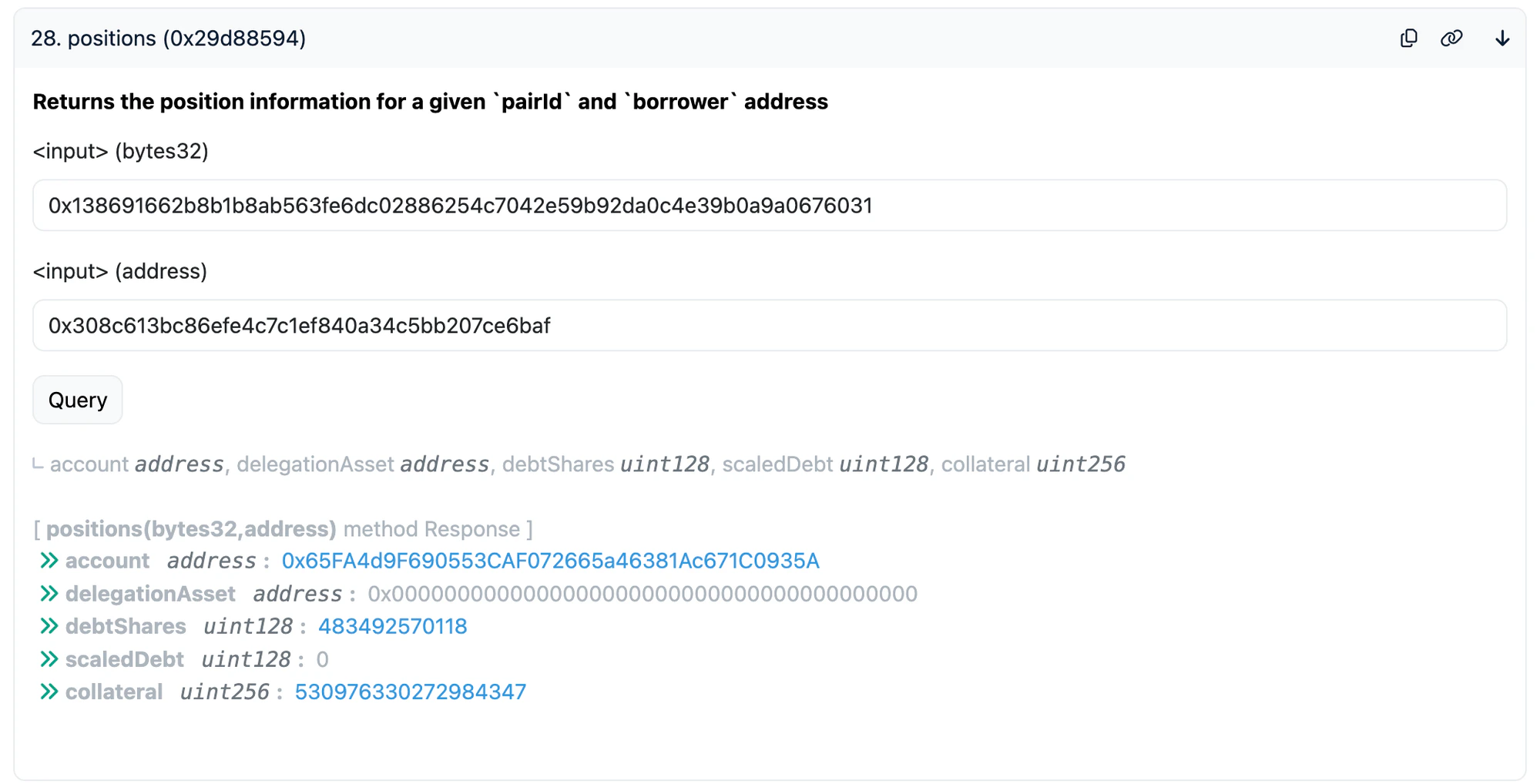
*Example: querying the hyperUSDC/USDC pair (`0x1386...6031`) for address `0x308c...6baf` — result shows `debtShares`, `scaledDebt`, and `collateral`:*
### Check Borrow Position
Find and expand the **`positions`** function.
| Parameter | What to enter |
| --------- | --------------------------------- |
| `pairId` | Your pair ID from the table above |
| `account` | Your wallet address |
Click **Query**. You will see:
| Field | Meaning |
| ------------ | ------------------------------------------------- |
| `account` | Your proxy account address (used internally) |
| `debtShares` | Your share of the debt pool |
| `collateral` | Your collateral amount (in token's smallest unit) |
*Example: querying the hyperUSDC/USDC pair (`0x1386...6031`) for address `0x308c...6baf` — result shows `debtShares`, `scaledDebt`, and `collateral`:*
 ### Check Restake Position
Find and expand the **`restakers`** function.
| Parameter | What to enter |
| ------------------ | -------------------------------------------- |
| `delegationPairId` | Your delegation pair ID from the table above |
| `account` | Your wallet address |
Click **Query**. You will see:
| Field | Meaning |
| -------------- | ---------------------------------------------- |
| `scaledSupply` | Your restaked amount (scaled — see note below) |
| `interest` | Accrued interest you can claim |
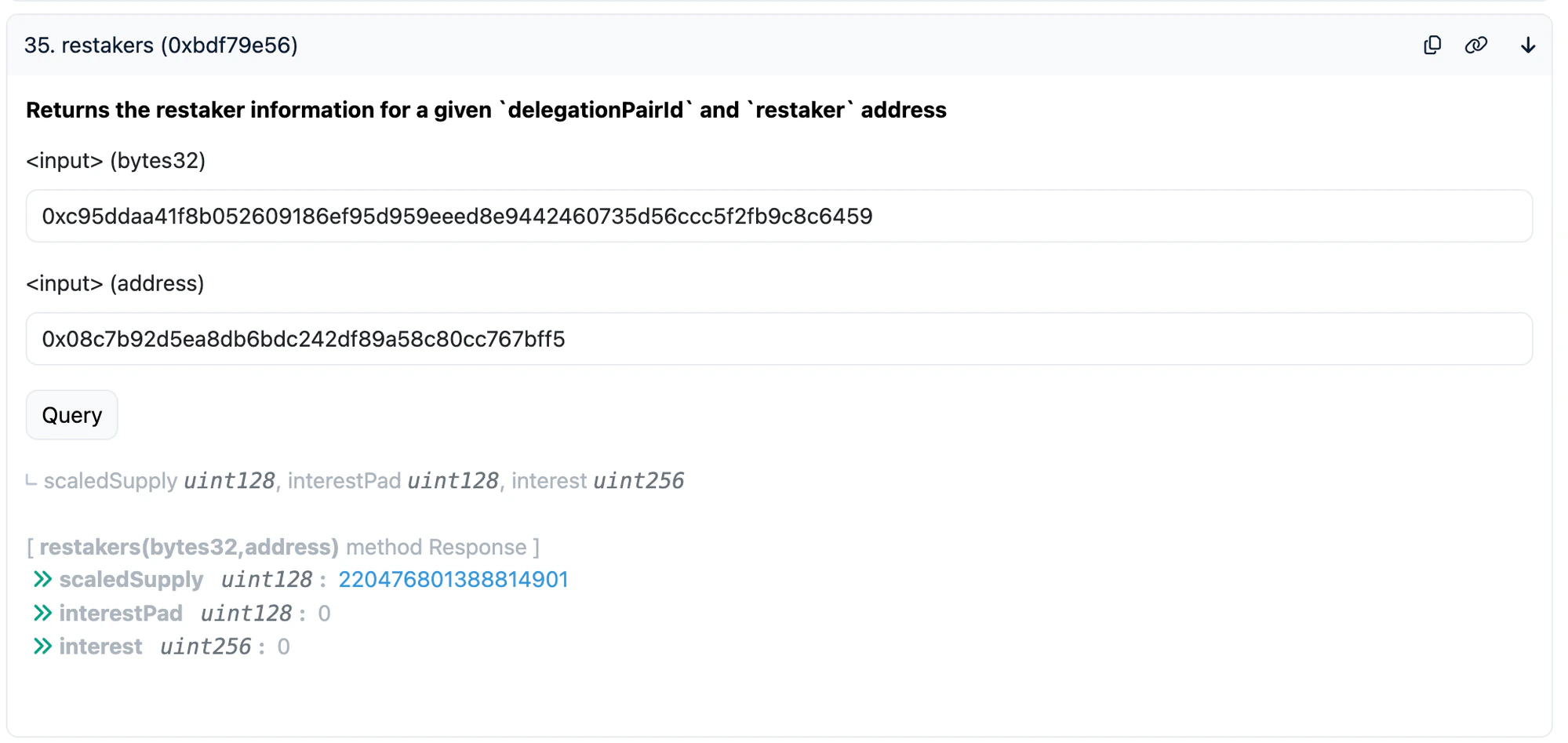
*Example: querying the aEthWETH/WETH restake pool (`0xc95d...6459`) for address `0x08c7...bff5` — result shows `scaledSupply` and `interest`:*
### Check Restake Position
Find and expand the **`restakers`** function.
| Parameter | What to enter |
| ------------------ | -------------------------------------------- |
| `delegationPairId` | Your delegation pair ID from the table above |
| `account` | Your wallet address |
Click **Query**. You will see:
| Field | Meaning |
| -------------- | ---------------------------------------------- |
| `scaledSupply` | Your restaked amount (scaled — see note below) |
| `interest` | Accrued interest you can claim |
*Example: querying the aEthWETH/WETH restake pool (`0xc95d...6459`) for address `0x08c7...bff5` — result shows `scaledSupply` and `interest`:*
 > **Note:** `scaledSupply` is RAY-scaled (divided by 10^27 with the liquidity index). The actual amount is approximately `scaledSupply * liquidityIndex / 10^27`.
***
## 3. Unstake (Withdraw Restaked Assets)
This withdraws your restaked aTokens (e.g. aEthUSDC, aSonUSDC, aPlaUSDT0) from Diamond246.
### Step by Step
1. Go to Diamond246 on the block explorer
2. Click **"Diamond Proxy"** > **"Write"**
3. Click **"Connect to Web3"** and connect your wallet
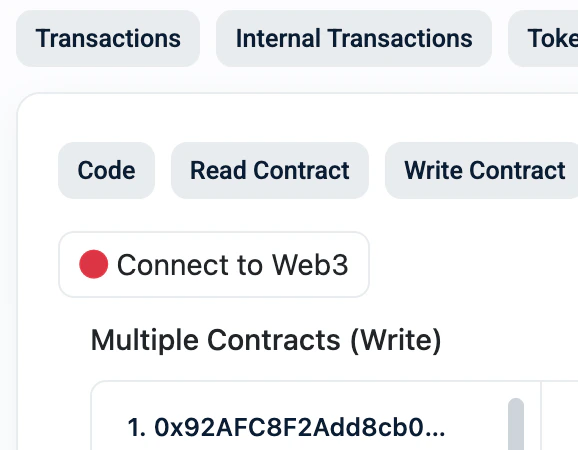
*The "Connect to Web3" button — make sure it shows green (connected) before proceeding:*
> **Note:** `scaledSupply` is RAY-scaled (divided by 10^27 with the liquidity index). The actual amount is approximately `scaledSupply * liquidityIndex / 10^27`.
***
## 3. Unstake (Withdraw Restaked Assets)
This withdraws your restaked aTokens (e.g. aEthUSDC, aSonUSDC, aPlaUSDT0) from Diamond246.
### Step by Step
1. Go to Diamond246 on the block explorer
2. Click **"Diamond Proxy"** > **"Write"**
3. Click **"Connect to Web3"** and connect your wallet
*The "Connect to Web3" button — make sure it shows green (connected) before proceeding:*
 4. In the left sidebar, click **"RestakingFacet"**
5. Find and expand the **`unstake`** function
6. Fill in the parameters:
| Parameter | What to enter |
| -------------------------------- | ------------------------------------------------------------------------------------------------------------------- |
| `delegationPairAssets` > `asset` | The aToken address (see table below) |
| `delegationPairAssets` > `debt` | The debt token address (see table below) |
| `amount` | Use max value for full withdrawal: `115792089237316195423570985008687907853269984665640564039457584007913129639935` |
| `onBehalf` | Your wallet address |
| `receiver` | Your wallet address |
7. Click **Write** and confirm in your wallet
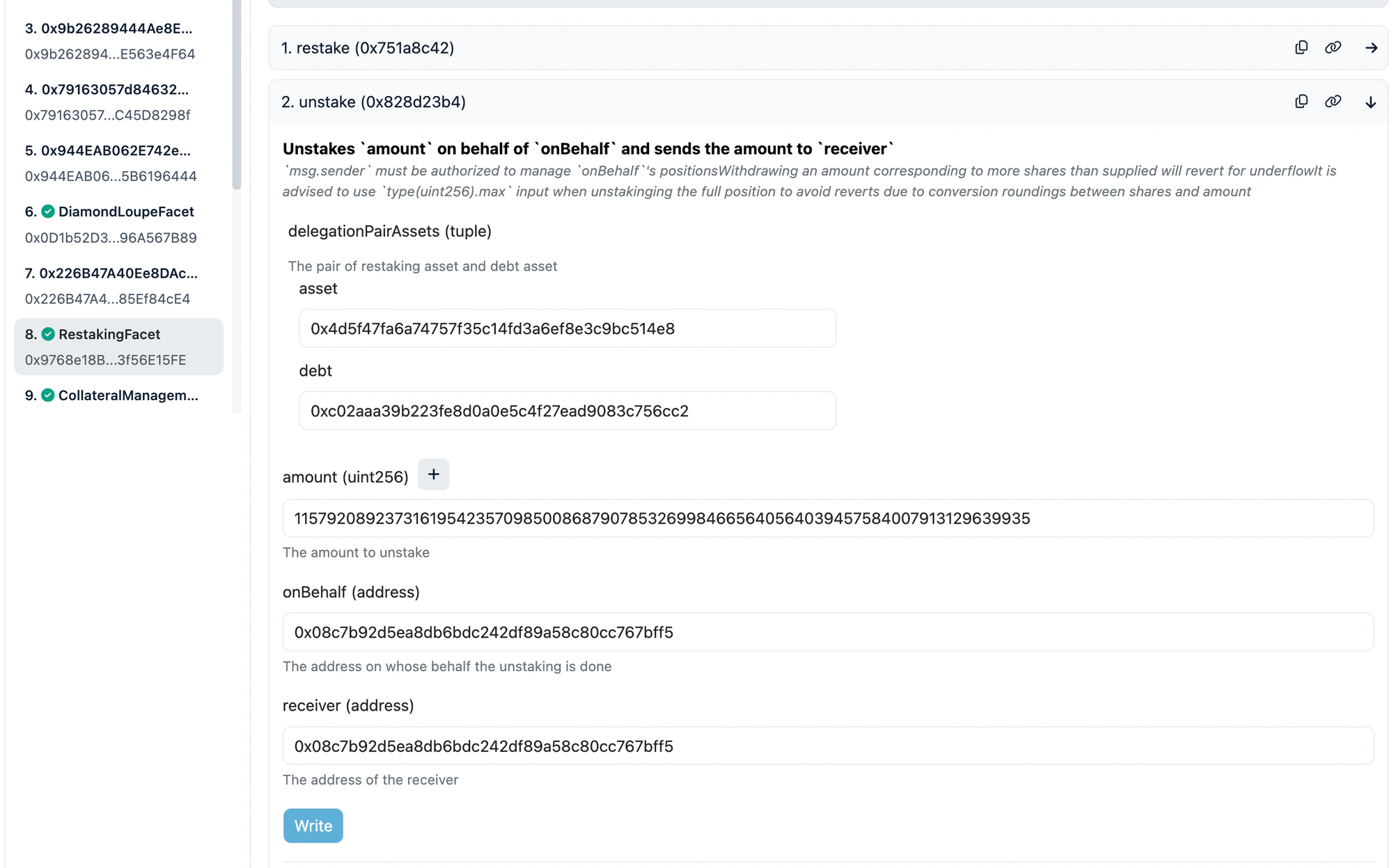
*Example: unstaking from the aEthWETH/WETH pool — RestakingFacet selected, `unstake` expanded with aToken and debt addresses filled, max amount for full withdrawal:*
4. In the left sidebar, click **"RestakingFacet"**
5. Find and expand the **`unstake`** function
6. Fill in the parameters:
| Parameter | What to enter |
| -------------------------------- | ------------------------------------------------------------------------------------------------------------------- |
| `delegationPairAssets` > `asset` | The aToken address (see table below) |
| `delegationPairAssets` > `debt` | The debt token address (see table below) |
| `amount` | Use max value for full withdrawal: `115792089237316195423570985008687907853269984665640564039457584007913129639935` |
| `onBehalf` | Your wallet address |
| `receiver` | Your wallet address |
7. Click **Write** and confirm in your wallet
*Example: unstaking from the aEthWETH/WETH pool — RestakingFacet selected, `unstake` expanded with aToken and debt addresses filled, max amount for full withdrawal:*
 ### Token Addresses for `unstake`
#### Ethereum
| asset (aToken) | Address | debt | Address |
| -------------- | -------------------------------------------- | ---- | -------------------------------------------- |
| aEthUSDC | `0x98c23e9d8f34fefb1b7bd6a91b7ff122f4e16f5c` | GHO | `0x40d16fc0246ad3160ccc09b8d0d3a2cd28ae6c2f` |
| aEthUSDC | `0x98c23e9d8f34fefb1b7bd6a91b7ff122f4e16f5c` | USDC | `0xa0b86991c6218b36c1d19d4a2e9eb0ce3606eb48` |
| aEthWETH | `0x4d5f47fa6a74757f35c14fd3a6ef8e3c9bc514e8` | WETH | `0xc02aaa39b223fe8d0a0e5c4f27ead9083c756cc2` |
#### Sonic
| asset (aToken) | Address | debt | Address |
| -------------- | -------------------------------------------- | ------ | -------------------------------------------- |
| aSonUSDC | `0x578ee1ca3a8e1b54554da1bf7c583506c4cd11c6` | USDC.e | `0x29219dd400f2bf60e5a23d13be72b486d4038894` |
#### Plasma
| asset (aToken) | Address | debt | Address |
| -------------- | -------------------------------------------- | ----- | -------------------------------------------- |
| aPlaUSDT0 | `0x5d72a9d9a9510cd8cbdba12ac62593a58930a948` | USDT0 | `0xb8ce59fc3717ada4c02eadf9682a9e934f625ebb` |
### After Unstaking: Withdraw from Aave
After unstaking, you receive the **aToken** (e.g. aEthUSDC, aSonUSDC, aPlaUSDT0). To get the underlying token (e.g. USDC), withdraw via the Aave UI:
**[app.aave.com](https://app.aave.com/)** — Go to Dashboard > find your supplied asset > click **Withdraw** > enter max amount > confirm.
***
## 3.5. Redeem re-aUSDC (Sonic Only)
If you hold **re-aUSDC** on Sonic, you need to redeem it to get back your aSonUSDC (aToken).
**re-aUSDC Contract:** [`0x561d1907dd7C0B92E5278356BC230B7e94704d57`](https://sonicscan.org/address/0x561d1907dd7C0B92E5278356BC230B7e94704d57)
re-aUSDC is an ERC4626 vault. Use `withdraw` to get back an exact amount of aSonUSDC.
### Step by Step
1. Go to the [re-aUSDC contract on Sonicscan](https://sonicscan.org/address/0x561d1907dd7C0B92E5278356BC230B7e94704d57#readContract)
2. Click **"Read Contract"** > find **`maxWithdraw`** > enter your wallet address > click **Query**
3. Copy the returned value — this is the maximum aSonUSDC you can withdraw
4. Switch to the **"Write Contract"** tab > **"Connect to Web3"**
5. Find and expand the **`withdraw`** function
6. Fill in:
| Parameter | What to enter |
| ---------- | ----------------------------------- |
| `assets` | The `maxWithdraw` value from step 3 |
| `receiver` | Your wallet address |
| `owner` | Your wallet address |
7. Click **Write** and confirm
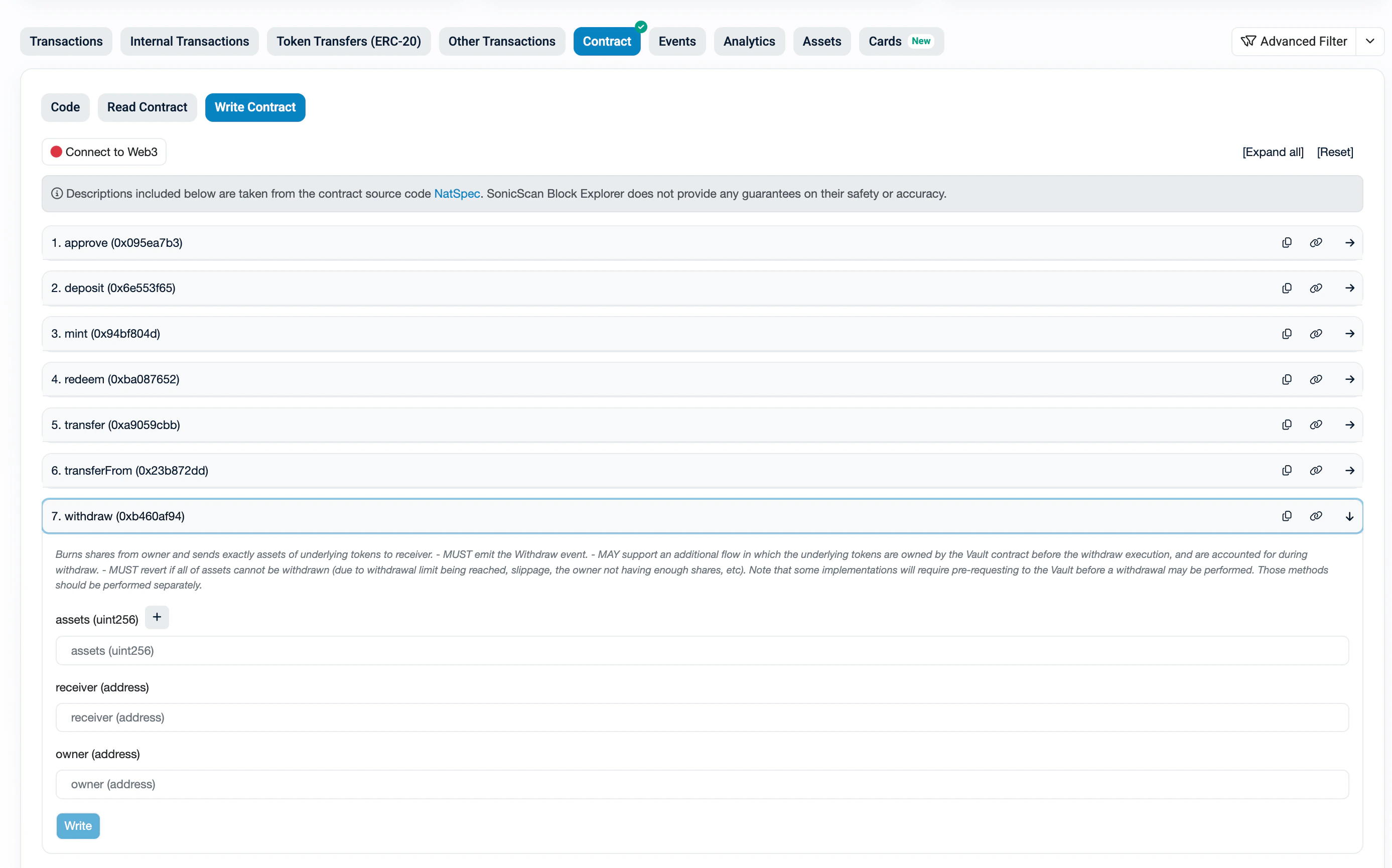
*re-aUSDC contract on Sonicscan — `withdraw` function expanded with assets, receiver, and owner fields:*
### Token Addresses for `unstake`
#### Ethereum
| asset (aToken) | Address | debt | Address |
| -------------- | -------------------------------------------- | ---- | -------------------------------------------- |
| aEthUSDC | `0x98c23e9d8f34fefb1b7bd6a91b7ff122f4e16f5c` | GHO | `0x40d16fc0246ad3160ccc09b8d0d3a2cd28ae6c2f` |
| aEthUSDC | `0x98c23e9d8f34fefb1b7bd6a91b7ff122f4e16f5c` | USDC | `0xa0b86991c6218b36c1d19d4a2e9eb0ce3606eb48` |
| aEthWETH | `0x4d5f47fa6a74757f35c14fd3a6ef8e3c9bc514e8` | WETH | `0xc02aaa39b223fe8d0a0e5c4f27ead9083c756cc2` |
#### Sonic
| asset (aToken) | Address | debt | Address |
| -------------- | -------------------------------------------- | ------ | -------------------------------------------- |
| aSonUSDC | `0x578ee1ca3a8e1b54554da1bf7c583506c4cd11c6` | USDC.e | `0x29219dd400f2bf60e5a23d13be72b486d4038894` |
#### Plasma
| asset (aToken) | Address | debt | Address |
| -------------- | -------------------------------------------- | ----- | -------------------------------------------- |
| aPlaUSDT0 | `0x5d72a9d9a9510cd8cbdba12ac62593a58930a948` | USDT0 | `0xb8ce59fc3717ada4c02eadf9682a9e934f625ebb` |
### After Unstaking: Withdraw from Aave
After unstaking, you receive the **aToken** (e.g. aEthUSDC, aSonUSDC, aPlaUSDT0). To get the underlying token (e.g. USDC), withdraw via the Aave UI:
**[app.aave.com](https://app.aave.com/)** — Go to Dashboard > find your supplied asset > click **Withdraw** > enter max amount > confirm.
***
## 3.5. Redeem re-aUSDC (Sonic Only)
If you hold **re-aUSDC** on Sonic, you need to redeem it to get back your aSonUSDC (aToken).
**re-aUSDC Contract:** [`0x561d1907dd7C0B92E5278356BC230B7e94704d57`](https://sonicscan.org/address/0x561d1907dd7C0B92E5278356BC230B7e94704d57)
re-aUSDC is an ERC4626 vault. Use `withdraw` to get back an exact amount of aSonUSDC.
### Step by Step
1. Go to the [re-aUSDC contract on Sonicscan](https://sonicscan.org/address/0x561d1907dd7C0B92E5278356BC230B7e94704d57#readContract)
2. Click **"Read Contract"** > find **`maxWithdraw`** > enter your wallet address > click **Query**
3. Copy the returned value — this is the maximum aSonUSDC you can withdraw
4. Switch to the **"Write Contract"** tab > **"Connect to Web3"**
5. Find and expand the **`withdraw`** function
6. Fill in:
| Parameter | What to enter |
| ---------- | ----------------------------------- |
| `assets` | The `maxWithdraw` value from step 3 |
| `receiver` | Your wallet address |
| `owner` | Your wallet address |
7. Click **Write** and confirm
*re-aUSDC contract on Sonicscan — `withdraw` function expanded with assets, receiver, and owner fields:*
 After withdrawing, you will receive **aSonUSDC**. Then withdraw from Aave ([app.aave.com](https://app.aave.com/)) to get USDC.e.
***
## 4. Repay Debt
If you have an outstanding borrow position, you must repay the debt before withdrawing collateral.
### How much debt do I owe?
Your debt amount can be calculated from on-chain data:
1. Go to Diamond246 > **"Diamond Proxy"** > **"Read"**
2. Call **`positions`** with your pairId + wallet address — note your **`debtShares`**
3. Call **`pairs`** with the same pairId — note **`totalDebtShares`** and **`totalScaledDebt`**
**Your debt ≈ `(debtShares × totalScaledDebt) / totalDebtShares`**
> **Note:** This gives you an approximate amount in the token's smallest unit (e.g. 6 decimals for USDC, so `100000000` = 100 USDC). The actual debt accrues interest over time, so approve a bit more than this estimate (e.g. add 1%). The `repay` function only transfers the exact amount owed — any excess stays in your wallet.
### Step 1: Approve Diamond246
Before repaying, you need to **approve** Diamond246 to spend your debt token.
> **Tip:** Don't approve max uint256 if you're uncomfortable with unlimited approvals. Instead, approve an amount slightly above your estimated debt. The `repay` function only transfers the exact amount owed — any excess approval is not spent.
1. Go to the **debt token contract** on the block explorer (links below)
2. Click **"Write as Proxy"** (for proxy tokens like USDC) or **"Write Contract"**
3. Click **"Connect to Web3"**
4. Find the **`approve`** function
5. Fill in:
| Parameter | What to enter |
| --------- | ------------------------------------------------------------------------------------------------- |
| `spender` | `0x2460a05cC7C9e0f1e20B9b98C6F54aCaad221b98` (Diamond246) |
| `amount` | Your estimated debt amount with buffer (in token's smallest unit, e.g. for 100 USDC: `100000000`) |
6. Click **Write** and confirm
7. (Optional) After repaying, you can revoke the approval by calling `approve` again with amount `0`
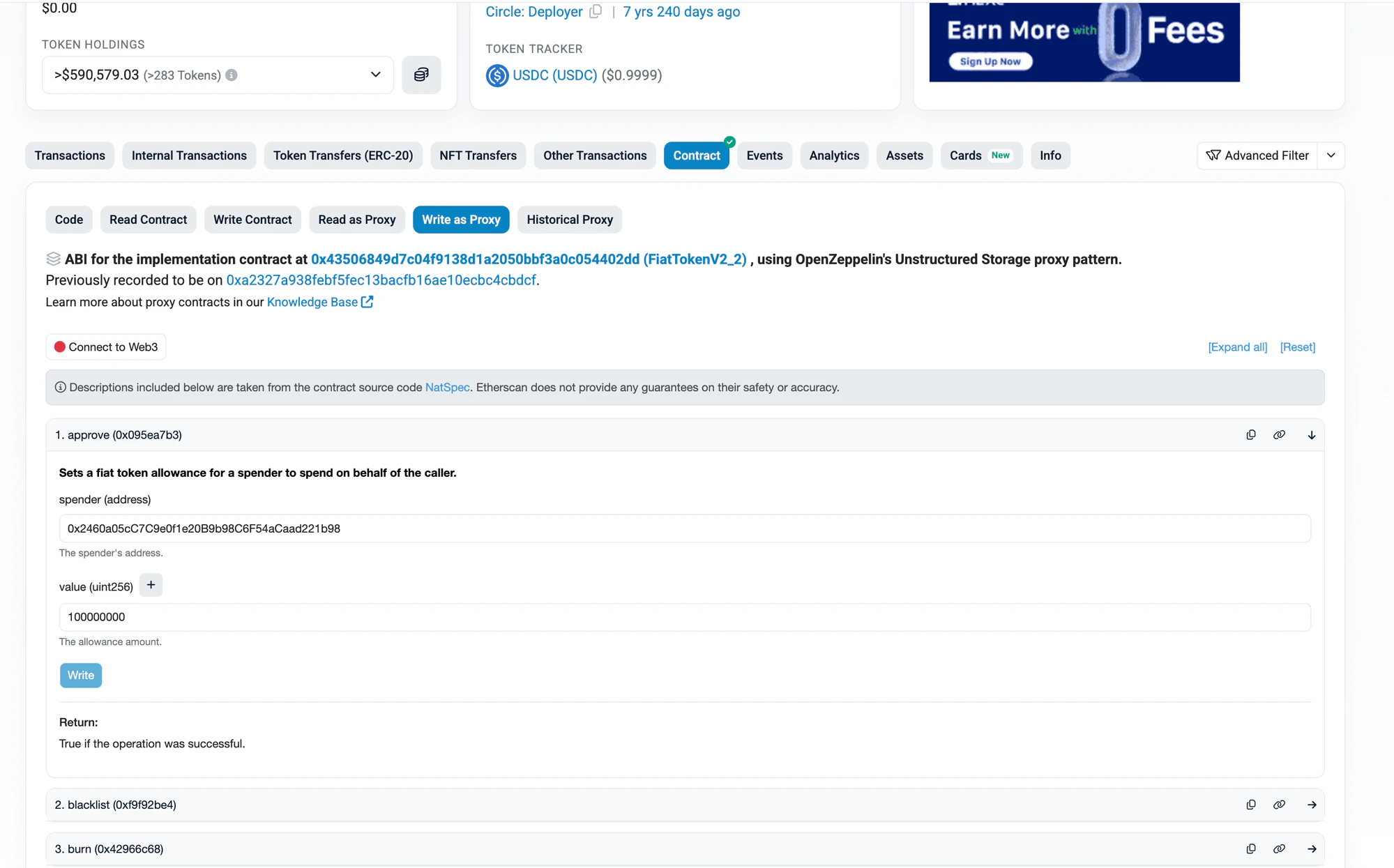
*Example: approving USDC on Etherscan — `approve` expanded with Diamond246 as spender and 100 USDC (100000000) as value:*
After withdrawing, you will receive **aSonUSDC**. Then withdraw from Aave ([app.aave.com](https://app.aave.com/)) to get USDC.e.
***
## 4. Repay Debt
If you have an outstanding borrow position, you must repay the debt before withdrawing collateral.
### How much debt do I owe?
Your debt amount can be calculated from on-chain data:
1. Go to Diamond246 > **"Diamond Proxy"** > **"Read"**
2. Call **`positions`** with your pairId + wallet address — note your **`debtShares`**
3. Call **`pairs`** with the same pairId — note **`totalDebtShares`** and **`totalScaledDebt`**
**Your debt ≈ `(debtShares × totalScaledDebt) / totalDebtShares`**
> **Note:** This gives you an approximate amount in the token's smallest unit (e.g. 6 decimals for USDC, so `100000000` = 100 USDC). The actual debt accrues interest over time, so approve a bit more than this estimate (e.g. add 1%). The `repay` function only transfers the exact amount owed — any excess stays in your wallet.
### Step 1: Approve Diamond246
Before repaying, you need to **approve** Diamond246 to spend your debt token.
> **Tip:** Don't approve max uint256 if you're uncomfortable with unlimited approvals. Instead, approve an amount slightly above your estimated debt. The `repay` function only transfers the exact amount owed — any excess approval is not spent.
1. Go to the **debt token contract** on the block explorer (links below)
2. Click **"Write as Proxy"** (for proxy tokens like USDC) or **"Write Contract"**
3. Click **"Connect to Web3"**
4. Find the **`approve`** function
5. Fill in:
| Parameter | What to enter |
| --------- | ------------------------------------------------------------------------------------------------- |
| `spender` | `0x2460a05cC7C9e0f1e20B9b98C6F54aCaad221b98` (Diamond246) |
| `amount` | Your estimated debt amount with buffer (in token's smallest unit, e.g. for 100 USDC: `100000000`) |
6. Click **Write** and confirm
7. (Optional) After repaying, you can revoke the approval by calling `approve` again with amount `0`
*Example: approving USDC on Etherscan — `approve` expanded with Diamond246 as spender and 100 USDC (100000000) as value:*
 #### Debt Token Contracts
| Token | Chain | Address | Explorer Link |
| ------ | -------- | -------------------------------------------- | ------------------------------------------------------------------------------------------------------------ |
| GHO | Ethereum | `0x40d16fc0246ad3160ccc09b8d0d3a2cd28ae6c2f` | [Etherscan](https://etherscan.io/address/0x40d16fc0246ad3160ccc09b8d0d3a2cd28ae6c2f#writeProxyContract) |
| USDC | Ethereum | `0xa0b86991c6218b36c1d19d4a2e9eb0ce3606eb48` | [Etherscan](https://etherscan.io/address/0xa0b86991c6218b36c1d19d4a2e9eb0ce3606eb48#writeProxyContract) |
| WETH | Ethereum | `0xc02aaa39b223fe8d0a0e5c4f27ead9083c756cc2` | [Etherscan](https://etherscan.io/address/0xc02aaa39b223fe8d0a0e5c4f27ead9083c756cc2#writeContract) |
| USDC.e | Sonic | `0x29219dd400f2bf60e5a23d13be72b486d4038894` | [Sonicscan](https://sonicscan.org/address/0x29219dd400f2bf60e5a23d13be72b486d4038894#writeContract) |
| USDT0 | Plasma | `0xb8ce59fc3717ada4c02eadf9682a9e934f625ebb` | [Plasmascan](https://testnet.plasmascan.io/address/0xb8ce59fc3717ada4c02eadf9682a9e934f625ebb#writeContract) |
### Step 2: Repay on Diamond246
1. Go to Diamond246 > **"Diamond Proxy"** > **"Write"**
2. In the left sidebar, click **"BorrowingFacet"**
3. Find and expand the **`repay`** function
4. Fill in:
| Parameter | What to enter |
| --------------------------- | --------------------------------------------------------------------------------------------- |
| `pairAssets` > `debt` | Debt token address |
| `pairAssets` > `collateral` | Collateral token address |
| `amount` | `0` (use share for full repay) |
| `share` | Max uint256: `115792089237316195423570985008687907853269984665640564039457584007913129639935` |
| `onBehalf` | Your wallet address |
| `data` | `0x` |
5. Click **Write** and confirm
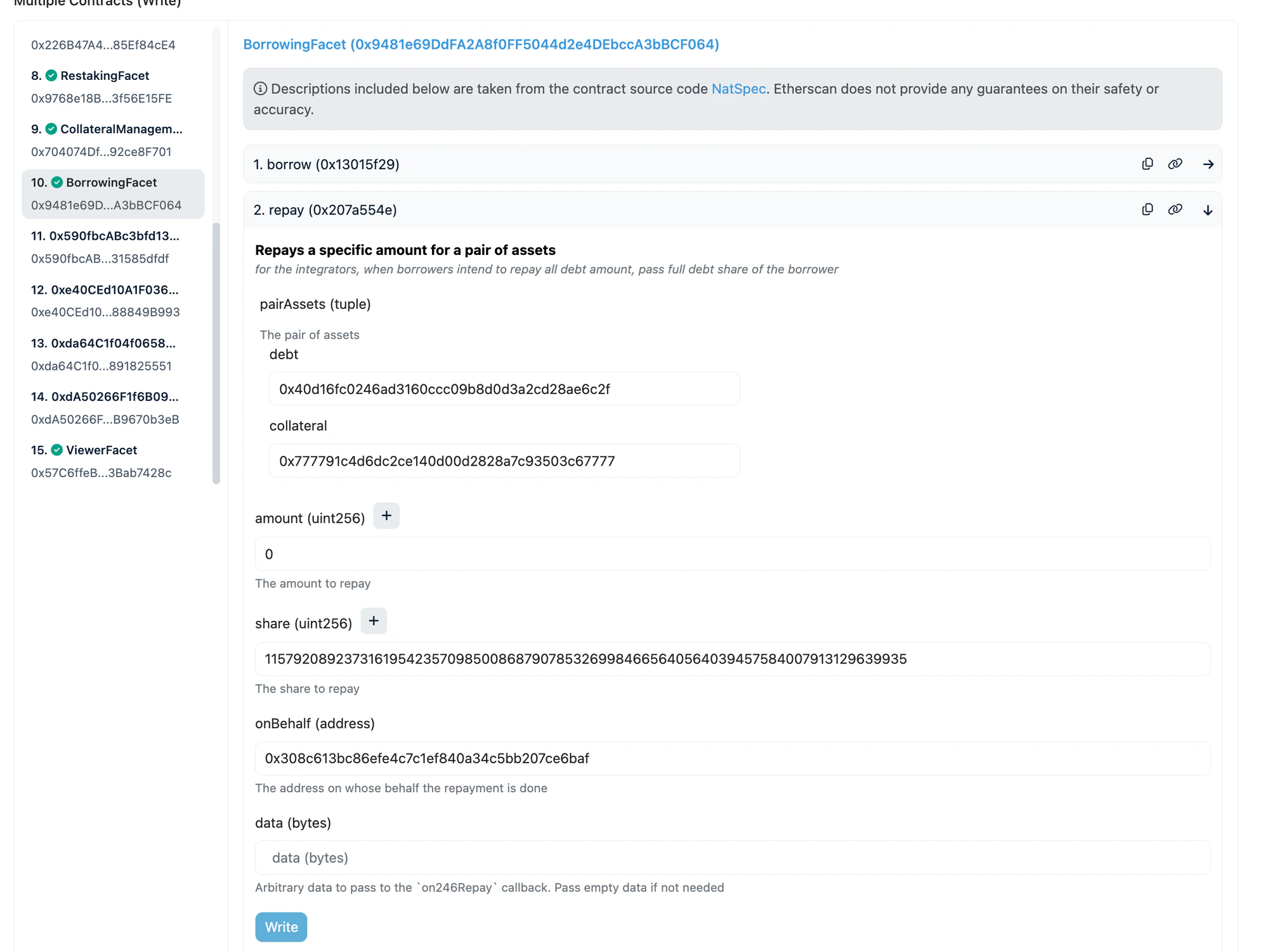
*Example: repaying on the hyperUSDC/GHO pair — BorrowingFacet selected, `repay` expanded with GHO as debt (`0x40d1...6c2f`), hyperUSDC as collateral (`0x7777...7777`), amount=0 and share=max for full repay:*
#### Debt Token Contracts
| Token | Chain | Address | Explorer Link |
| ------ | -------- | -------------------------------------------- | ------------------------------------------------------------------------------------------------------------ |
| GHO | Ethereum | `0x40d16fc0246ad3160ccc09b8d0d3a2cd28ae6c2f` | [Etherscan](https://etherscan.io/address/0x40d16fc0246ad3160ccc09b8d0d3a2cd28ae6c2f#writeProxyContract) |
| USDC | Ethereum | `0xa0b86991c6218b36c1d19d4a2e9eb0ce3606eb48` | [Etherscan](https://etherscan.io/address/0xa0b86991c6218b36c1d19d4a2e9eb0ce3606eb48#writeProxyContract) |
| WETH | Ethereum | `0xc02aaa39b223fe8d0a0e5c4f27ead9083c756cc2` | [Etherscan](https://etherscan.io/address/0xc02aaa39b223fe8d0a0e5c4f27ead9083c756cc2#writeContract) |
| USDC.e | Sonic | `0x29219dd400f2bf60e5a23d13be72b486d4038894` | [Sonicscan](https://sonicscan.org/address/0x29219dd400f2bf60e5a23d13be72b486d4038894#writeContract) |
| USDT0 | Plasma | `0xb8ce59fc3717ada4c02eadf9682a9e934f625ebb` | [Plasmascan](https://testnet.plasmascan.io/address/0xb8ce59fc3717ada4c02eadf9682a9e934f625ebb#writeContract) |
### Step 2: Repay on Diamond246
1. Go to Diamond246 > **"Diamond Proxy"** > **"Write"**
2. In the left sidebar, click **"BorrowingFacet"**
3. Find and expand the **`repay`** function
4. Fill in:
| Parameter | What to enter |
| --------------------------- | --------------------------------------------------------------------------------------------- |
| `pairAssets` > `debt` | Debt token address |
| `pairAssets` > `collateral` | Collateral token address |
| `amount` | `0` (use share for full repay) |
| `share` | Max uint256: `115792089237316195423570985008687907853269984665640564039457584007913129639935` |
| `onBehalf` | Your wallet address |
| `data` | `0x` |
5. Click **Write** and confirm
*Example: repaying on the hyperUSDC/GHO pair — BorrowingFacet selected, `repay` expanded with GHO as debt (`0x40d1...6c2f`), hyperUSDC as collateral (`0x7777...7777`), amount=0 and share=max for full repay:*
 #### Collateral Token Addresses
| Token | Chain | Address |
| ------------ | -------- | -------------------------------------------- |
| hyperUSDC | Ethereum | `0x777791c4d6dc2ce140d00d2828a7c93503c67777` |
| fUSDC | Ethereum | `0xb0f05e4de970a1aaf77f8c2f823953a367504ba9` |
| bbqUSDC | Ethereum | `0xbeefff209270748ddd194831b3fa287a5386f5bc` |
| resolvUSDC | Ethereum | `0x132e6c9c33a62d7727cd359b1f51e5b566e485eb` |
| USUALUSDC+ | Ethereum | `0xd63070114470f685b75b74d60eec7c1113d33a3d` |
| Re7WETH | Ethereum | `0x78fc2c2ed1a4cdb5402365934ae5648adad094d0` |
| mhyETH | Ethereum | `0x701907283a57ff77e255c3f1aad790466b8ce4ef` |
| gtLRTcore | Ethereum | `0x4881ef0bf6d2365d3dd6499ccd7532bcdbce0658` |
| wstkscUSD | Sonic | `0x9fb76f7ce5fceaa2c42887ff441d46095e494206` |
| 246USDT0 | Plasma | `0x9c46ee1f01d2b551048f5ff99a4659d98d04bed1` |
| Re7USDT0Core | Plasma | `0xa5eed1615cd883dd6883ca3a385f525e3beb4e79` |
***
## 5. Withdraw Collateral
After repaying all debt, you can withdraw your collateral.
> **Important:** You must repay all debt first. If you have outstanding debt, this transaction will revert.
1. Go to Diamond246 > **"Diamond Proxy"** > **"Write"**
2. In the left sidebar, click **"CollateralManagementFacet"**
3. Find and expand the **`withdrawCollateral`** function
4. Fill in:
| Parameter | What to enter |
| --------------------------- | ------------------------------------------------------------------------------------ |
| `pairAssets` > `debt` | Debt token address (same as repay) |
| `pairAssets` > `collateral` | Collateral token address (same as repay) |
| `amount` | Your **exact** collateral amount from the `positions` query (do NOT use max uint256) |
| `onBehalf` | Your wallet address |
| `receiver` | Your wallet address |
5. Click **Write** and confirm
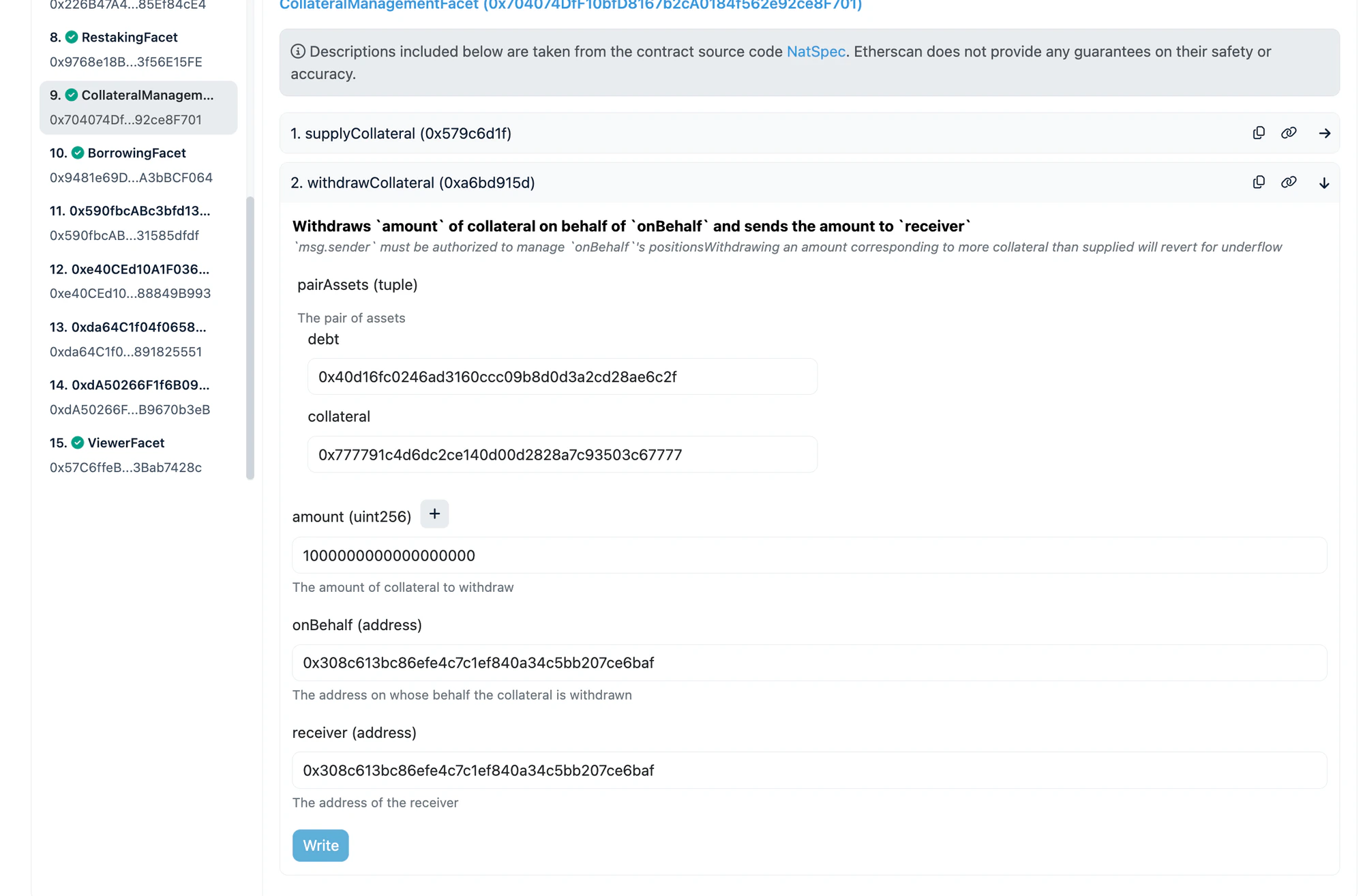
*Example: withdrawing collateral from the hyperUSDC/GHO pair — CollateralManagementFacet selected, `withdrawCollateral` expanded with GHO as debt, hyperUSDC as collateral, exact collateral amount entered:*
#### Collateral Token Addresses
| Token | Chain | Address |
| ------------ | -------- | -------------------------------------------- |
| hyperUSDC | Ethereum | `0x777791c4d6dc2ce140d00d2828a7c93503c67777` |
| fUSDC | Ethereum | `0xb0f05e4de970a1aaf77f8c2f823953a367504ba9` |
| bbqUSDC | Ethereum | `0xbeefff209270748ddd194831b3fa287a5386f5bc` |
| resolvUSDC | Ethereum | `0x132e6c9c33a62d7727cd359b1f51e5b566e485eb` |
| USUALUSDC+ | Ethereum | `0xd63070114470f685b75b74d60eec7c1113d33a3d` |
| Re7WETH | Ethereum | `0x78fc2c2ed1a4cdb5402365934ae5648adad094d0` |
| mhyETH | Ethereum | `0x701907283a57ff77e255c3f1aad790466b8ce4ef` |
| gtLRTcore | Ethereum | `0x4881ef0bf6d2365d3dd6499ccd7532bcdbce0658` |
| wstkscUSD | Sonic | `0x9fb76f7ce5fceaa2c42887ff441d46095e494206` |
| 246USDT0 | Plasma | `0x9c46ee1f01d2b551048f5ff99a4659d98d04bed1` |
| Re7USDT0Core | Plasma | `0xa5eed1615cd883dd6883ca3a385f525e3beb4e79` |
***
## 5. Withdraw Collateral
After repaying all debt, you can withdraw your collateral.
> **Important:** You must repay all debt first. If you have outstanding debt, this transaction will revert.
1. Go to Diamond246 > **"Diamond Proxy"** > **"Write"**
2. In the left sidebar, click **"CollateralManagementFacet"**
3. Find and expand the **`withdrawCollateral`** function
4. Fill in:
| Parameter | What to enter |
| --------------------------- | ------------------------------------------------------------------------------------ |
| `pairAssets` > `debt` | Debt token address (same as repay) |
| `pairAssets` > `collateral` | Collateral token address (same as repay) |
| `amount` | Your **exact** collateral amount from the `positions` query (do NOT use max uint256) |
| `onBehalf` | Your wallet address |
| `receiver` | Your wallet address |
5. Click **Write** and confirm
*Example: withdrawing collateral from the hyperUSDC/GHO pair — CollateralManagementFacet selected, `withdrawCollateral` expanded with GHO as debt, hyperUSDC as collateral, exact collateral amount entered:*
 > **Important:** For `amount`, use the exact `collateral` value returned by the `positions` read call in step 2. Do NOT use max uint256 — it will revert.
***
## Quick Reference: Full Exit Flow
### Restakers (no borrow position)
1. **Unstake** on Diamond246 (RestakingFacet) — receive aToken
2. **Withdraw** on [Aave UI](https://app.aave.com/) — receive underlying token (USDC, WETH, etc.)
### re-aUSDC holders (Sonic)
1. **Redeem** re-aUSDC on Sonicscan — receive aSonUSDC
2. **Withdraw** on [Aave UI](https://app.aave.com/) — receive USDC.e
### Borrowers
1. **Approve** debt token for Diamond246
2. **Repay** on Diamond246 (BorrowingFacet) — clear all debt
3. **Withdraw Collateral** on Diamond246 (CollateralManagementFacet) — receive collateral token
### Borrowers + Restakers
1. Approve > Repay > Withdraw Collateral (borrower exit)
2. Unstake > Aave Withdraw (restaker exit)
***
## Need Help?
Join our Telegram group: [https://t.me/+m0QLO9DeQKZjZmQ1](https://t.me/+m0QLO9DeQKZjZmQ1)
> **Important:** For `amount`, use the exact `collateral` value returned by the `positions` read call in step 2. Do NOT use max uint256 — it will revert.
***
## Quick Reference: Full Exit Flow
### Restakers (no borrow position)
1. **Unstake** on Diamond246 (RestakingFacet) — receive aToken
2. **Withdraw** on [Aave UI](https://app.aave.com/) — receive underlying token (USDC, WETH, etc.)
### re-aUSDC holders (Sonic)
1. **Redeem** re-aUSDC on Sonicscan — receive aSonUSDC
2. **Withdraw** on [Aave UI](https://app.aave.com/) — receive USDC.e
### Borrowers
1. **Approve** debt token for Diamond246
2. **Repay** on Diamond246 (BorrowingFacet) — clear all debt
3. **Withdraw Collateral** on Diamond246 (CollateralManagementFacet) — receive collateral token
### Borrowers + Restakers
1. Approve > Repay > Withdraw Collateral (borrower exit)
2. Unstake > Aave Withdraw (restaker exit)
***
## Need Help?
Join our Telegram group: [https://t.me/+m0QLO9DeQKZjZmQ1](https://t.me/+m0QLO9DeQKZjZmQ1)