> ## Documentation Index
> Fetch the complete documentation index at: https://docs.246club.xyz/llms.txt
> Use this file to discover all available pages before exploring further.
# Re-Lending UI Guide
> How to use the UI for re-lending on 246 Club.
Screenshots in this guide reflect a previous version of the UI. We’ll update them soon. The core flows and concepts remain the same.
# Re-Lending UI Guide
Please note that the term "Restake" has been updated to "Re-Lend." All references to "Restake" in the UI guide have been replaced with "Re-Lend" in the official user interface.
As outlined in the [Market Structure section](docs/architecture/market-structure), each market on 246Club consists :
* Re-Lending **Asset**: The asset that re-lenders supply (typically aTokens).
* **Delegation Asset**: The borrowing power derived from re-lenders' collateral, used by arbitrageurs to access capital.
Since the **re-lending asset** is what users directly interact with on the interface, this guide will focus on that side of the UI.
## Re-Lending Table
#### Re-Lending Asset Column
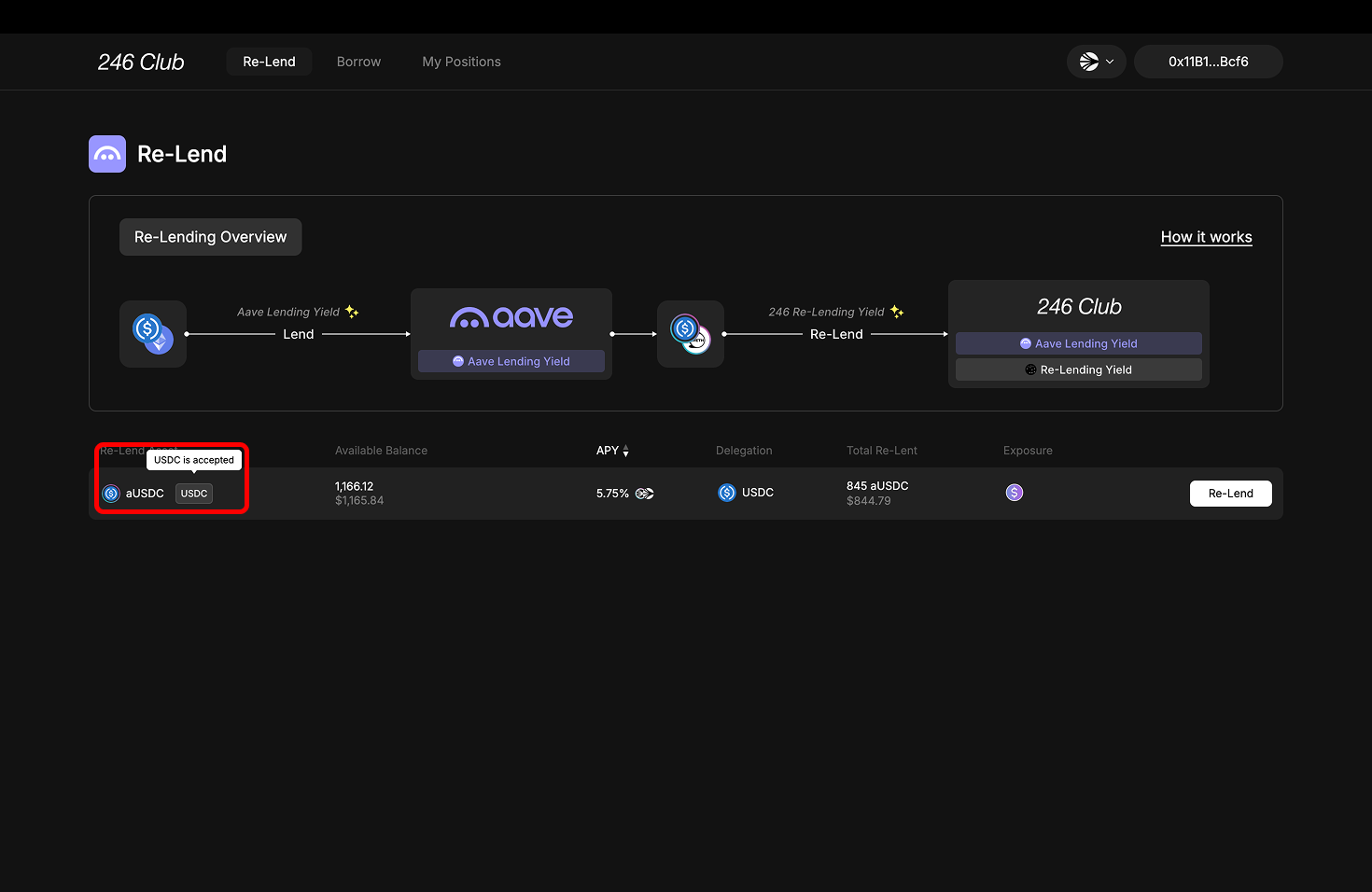 The leftmost column in the UI displays all supported **re-lending assets**—typically Aave’s aTokens like aUSDC, aDAI, etc.
However, users without existing aToken holdings can also choose to supply the **underlying asset** (e.g., USDC). Next to each aToken, you’ll also see its **underlying asset** (e.g., USDC for aUSDC, ETH or WETH for aWETH).
In that case, the protocol will:
1. Deposit the underlying into Aave.
2. Receive the corresponding aToken.
3. Automatically re-lend the aToken into 246Club.
> Note on ETH: Both ETH and WETH are supported as re-lending options, since Aave and 246 treat them equivalently when minting aWETH.
Whether you deposit an aToken or its underlying asset, the result is the same—you end up with a re-lent position in the 246 Club market. This feature simply provides flexibility for users without existing Aave positions.
#### Balance Column
The leftmost column in the UI displays all supported **re-lending assets**—typically Aave’s aTokens like aUSDC, aDAI, etc.
However, users without existing aToken holdings can also choose to supply the **underlying asset** (e.g., USDC). Next to each aToken, you’ll also see its **underlying asset** (e.g., USDC for aUSDC, ETH or WETH for aWETH).
In that case, the protocol will:
1. Deposit the underlying into Aave.
2. Receive the corresponding aToken.
3. Automatically re-lend the aToken into 246Club.
> Note on ETH: Both ETH and WETH are supported as re-lending options, since Aave and 246 treat them equivalently when minting aWETH.
Whether you deposit an aToken or its underlying asset, the result is the same—you end up with a re-lent position in the 246 Club market. This feature simply provides flexibility for users without existing Aave positions.
#### Balance Column
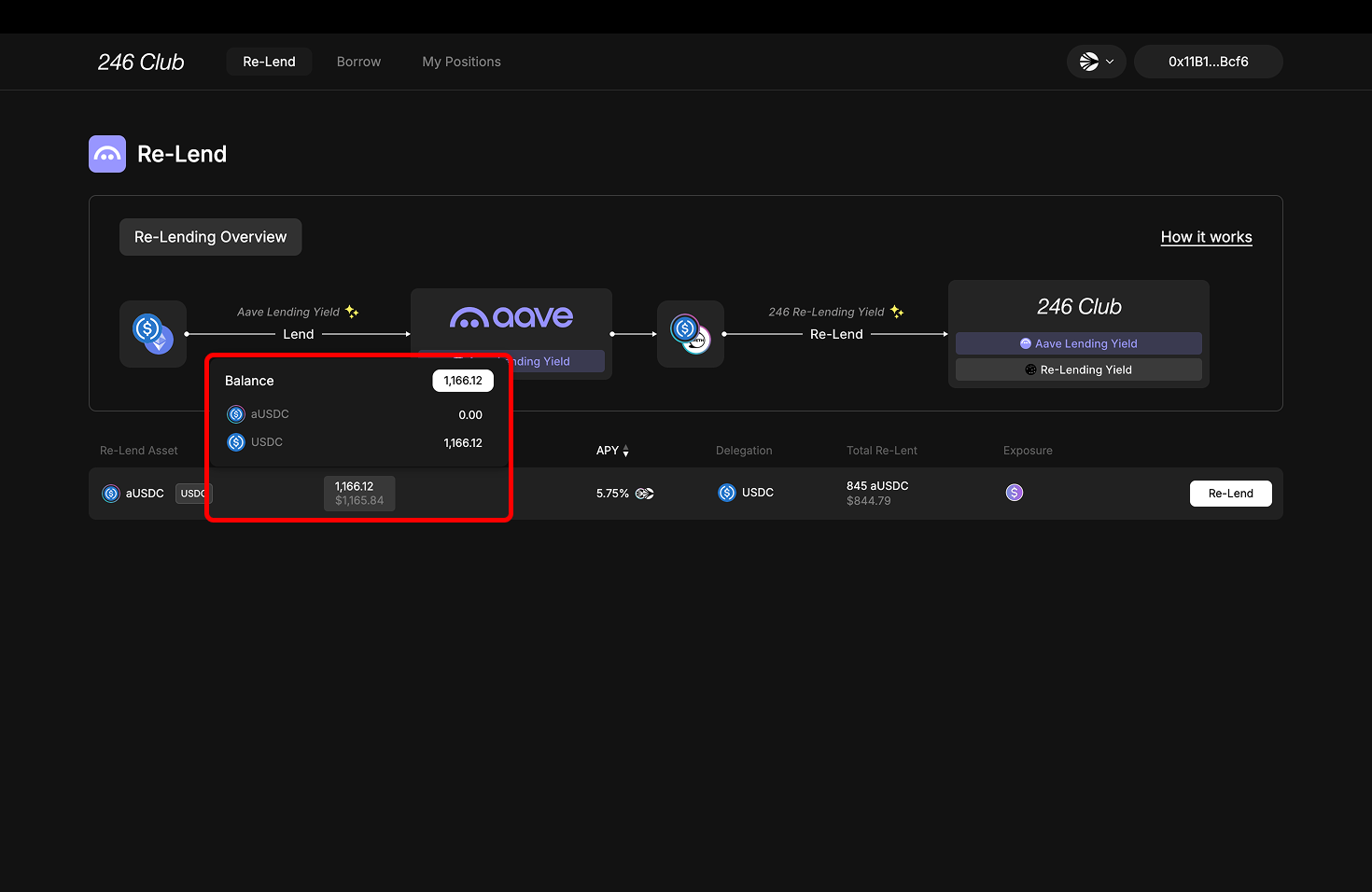 Balance column shows the total amount of assets available in your wallet for re-lending.
When you hover over the balance number, you’ll see a breakdown of:
* The amount of the **aToken** (e.g., aUSDC) you hold.
* The amount of the **underlying asset** (e.g., USDC) you hold.
* The **combined total** of both.
#### APY Column
Balance column shows the total amount of assets available in your wallet for re-lending.
When you hover over the balance number, you’ll see a breakdown of:
* The amount of the **aToken** (e.g., aUSDC) you hold.
* The amount of the **underlying asset** (e.g., USDC) you hold.
* The **combined total** of both.
#### APY Column
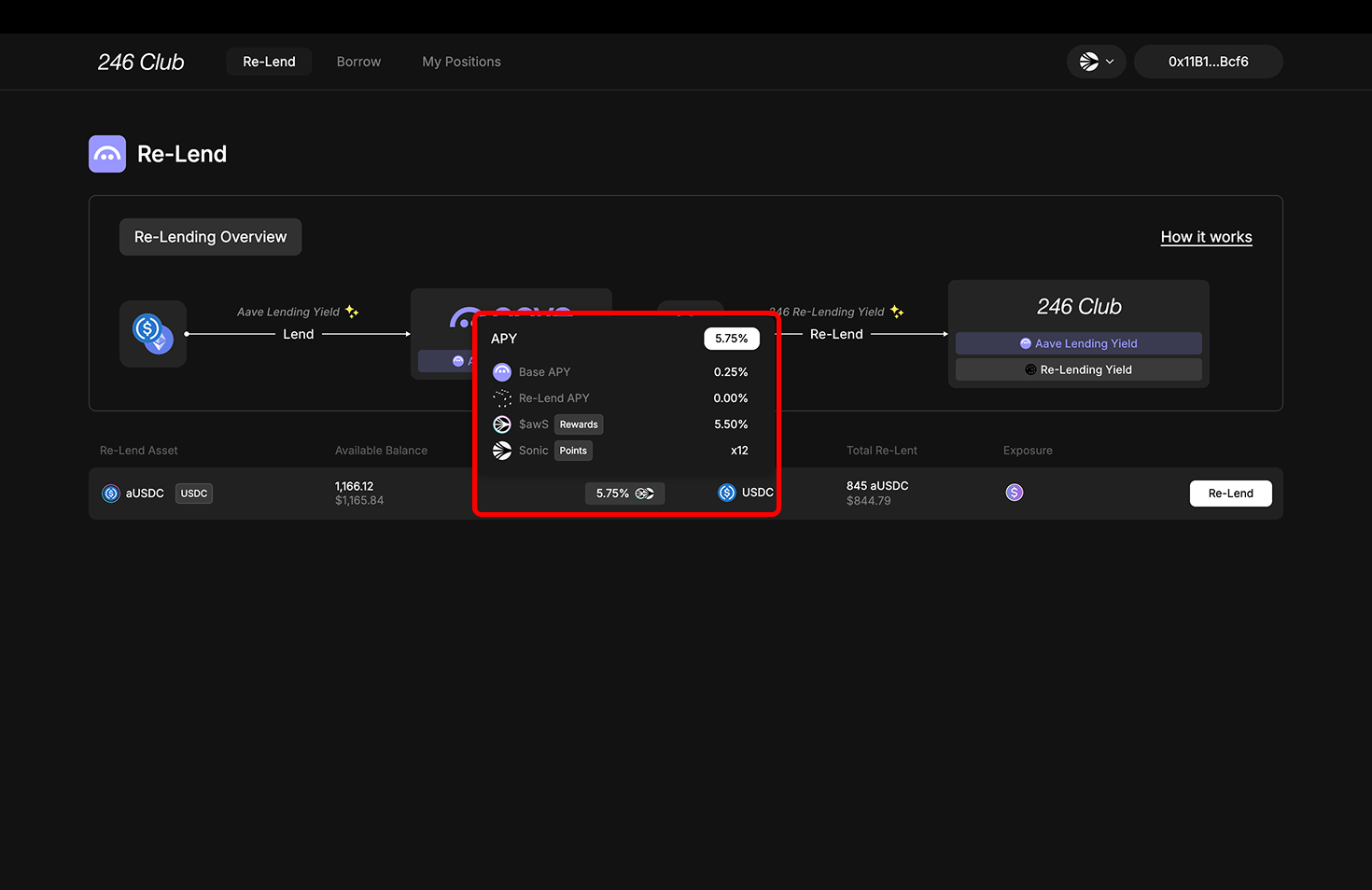 APY column displays the **Annual Percentage Yield (APY)** you’ll earn by re-lending.
Hovering over the **APY** column reveals a breakdown of:
* **Underlying APY**: The base interest rate you earn from supplying the aToken on Aave (e.g., the supply rate for aUSDC). This is a guaranteed return.
* Re-Lend **APY**: The additional yield you earn by re-lending your aToken and delegating its borrowing power in the 246 Club market.
* **Combined APY**: The total of the two rates.
The combined APY helps you estimate the full return on re-lending.
[Learn more about how Re-Lend APY works](docs/re-lend-supply/re-lend#3-where-additional-yield-comes-from)
## Re-Lend Modal
Clicking the supply button opens a modal where you can configure how much you want to re-lend.
There are three sections: one for re-lending aTokens and another for underlying assets and the summary section.
APY column displays the **Annual Percentage Yield (APY)** you’ll earn by re-lending.
Hovering over the **APY** column reveals a breakdown of:
* **Underlying APY**: The base interest rate you earn from supplying the aToken on Aave (e.g., the supply rate for aUSDC). This is a guaranteed return.
* Re-Lend **APY**: The additional yield you earn by re-lending your aToken and delegating its borrowing power in the 246 Club market.
* **Combined APY**: The total of the two rates.
The combined APY helps you estimate the full return on re-lending.
[Learn more about how Re-Lend APY works](docs/re-lend-supply/re-lend#3-where-additional-yield-comes-from)
## Re-Lend Modal
Clicking the supply button opens a modal where you can configure how much you want to re-lend.
There are three sections: one for re-lending aTokens and another for underlying assets and the summary section.
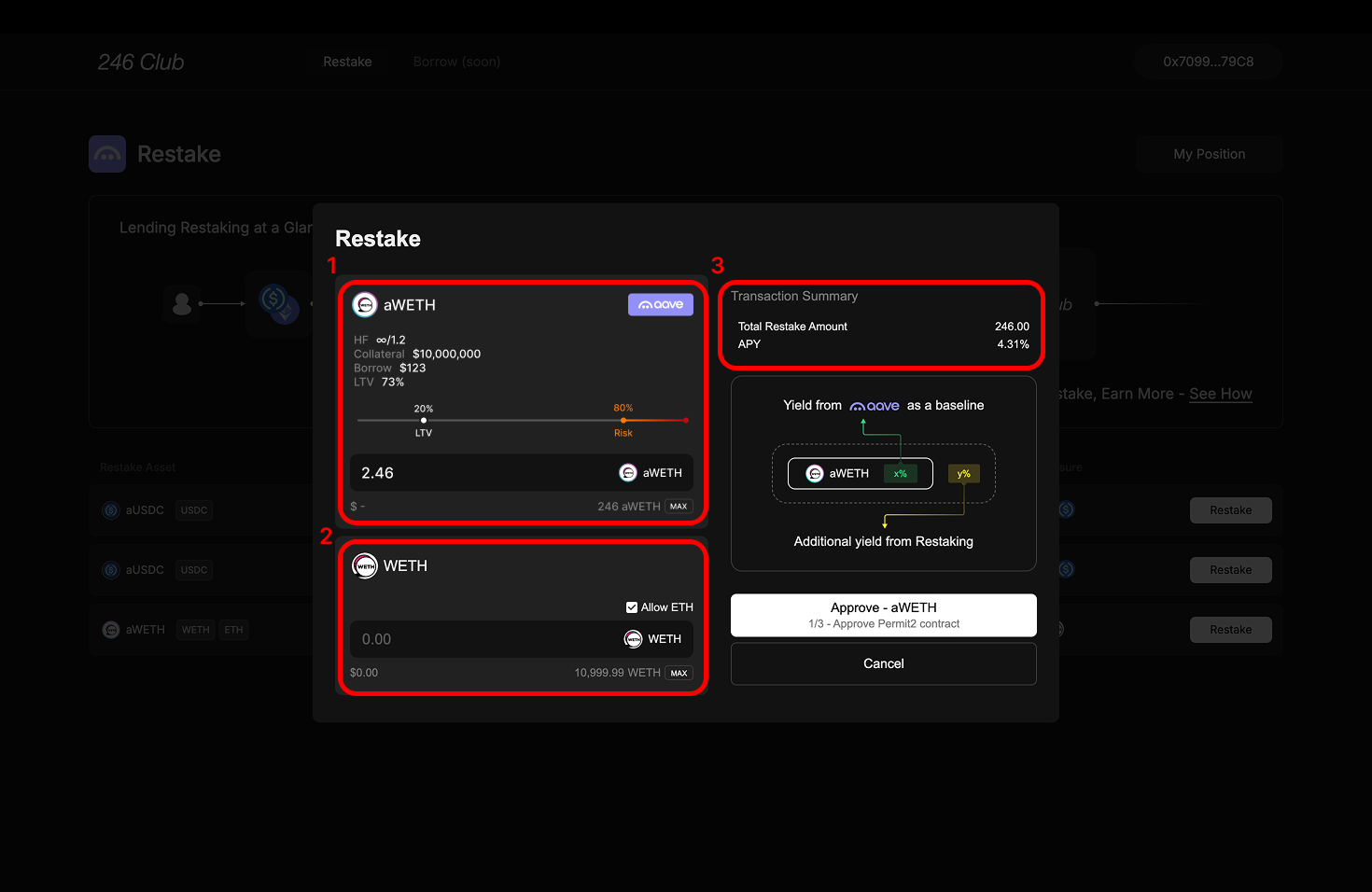 #### 1. Aave Position Section
At the top, you'll see a box with the Aave logo. This shows your current aToken balance and borrowing status on Aave tied to the aToken you’ve selected (e.g., aUSDC or aWETH).
If you already have a loan on Aave, your aTokens are likely being used as collateral. In that case, withdrawing and re-lending too much could impact your **health factor**.
We show:
* Current collateral and borrow value
* Estimated LTV after re-lending
* A visual indicator of the safe threshold
Make sure you stay above the safety threshold to avoid liquidation.
[More on managing Aave positions safely](docs/re-lend-supply/re-lend-considerations#re-lending-for-arbitrageurs-on-aave)
#### 2. Underlying Asset Section
Below the Aave box is where you can re-lend **underlying assets**.
* You can input any amount within your wallet balance.
* For ETH-based assets, WETH is used by default. You can also enable native ETH by checking the **“Allow ETH”** option.
You can use either or both fields—re-lending will combine the amounts.
#### 3. Summary Section
Once you’ve entered your desired inputs, you’ll see the **Total Re-Lent Amount** reflected. Confirm the transaction to complete re-lending.
## My Position
#### 1. Aave Position Section
At the top, you'll see a box with the Aave logo. This shows your current aToken balance and borrowing status on Aave tied to the aToken you’ve selected (e.g., aUSDC or aWETH).
If you already have a loan on Aave, your aTokens are likely being used as collateral. In that case, withdrawing and re-lending too much could impact your **health factor**.
We show:
* Current collateral and borrow value
* Estimated LTV after re-lending
* A visual indicator of the safe threshold
Make sure you stay above the safety threshold to avoid liquidation.
[More on managing Aave positions safely](docs/re-lend-supply/re-lend-considerations#re-lending-for-arbitrageurs-on-aave)
#### 2. Underlying Asset Section
Below the Aave box is where you can re-lend **underlying assets**.
* You can input any amount within your wallet balance.
* For ETH-based assets, WETH is used by default. You can also enable native ETH by checking the **“Allow ETH”** option.
You can use either or both fields—re-lending will combine the amounts.
#### 3. Summary Section
Once you’ve entered your desired inputs, you’ll see the **Total Re-Lent Amount** reflected. Confirm the transaction to complete re-lending.
## My Position
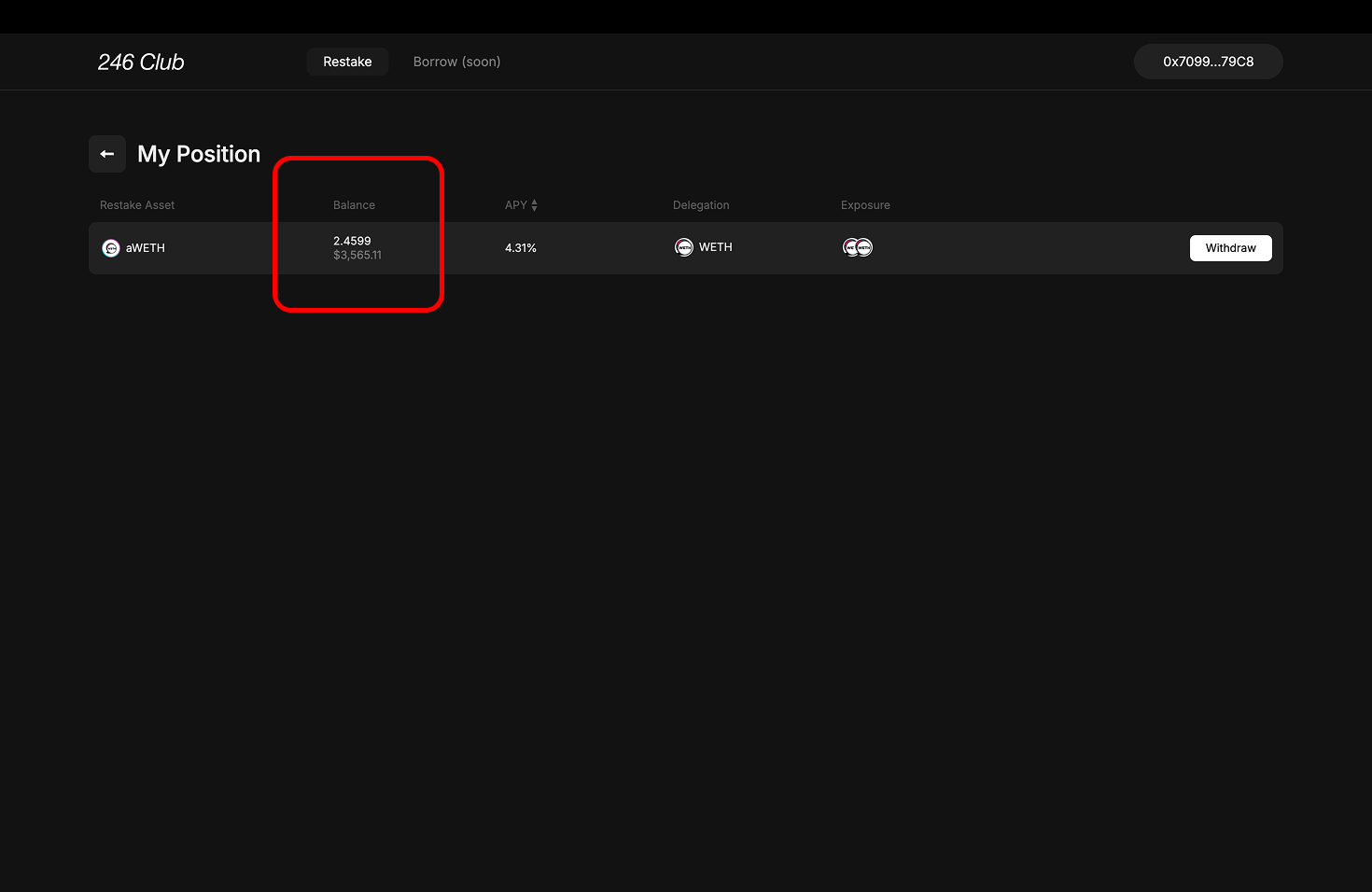 After a successful transaction, you’ll be redirected to the **My Position** page.
Even if you’ve re-lent the underlying asset, your re-lending balance will be shown denominated in your aToken balance.
This table is similar to the original re-lending table, with one key difference:
* **Balances here reflect your** re-lent **amount**, not what remains in your wallet.
***
After a successful transaction, you’ll be redirected to the **My Position** page.
Even if you’ve re-lent the underlying asset, your re-lending balance will be shown denominated in your aToken balance.
This table is similar to the original re-lending table, with one key difference:
* **Balances here reflect your** re-lent **amount**, not what remains in your wallet.
***