246Club is sunsetting. This guide walks you through withdrawing your positions directly on-chain using Etherscan, Sonicscan, or your chain’s block explorer. Diamond246 Contract: 0x2460a05cC7C9e0f1e20B9b98C6F54aCaad221b98 (same address on all chains)
The contract is verified on all chains. Since it uses the Diamond proxy pattern (EIP-2535), you’ll interact with it through the special “Diamond Proxy” tab on the block explorer.

ChainDiamond246 Link
EthereumView on Etherscan
SonicView on Sonicscan
PlasmaView on Plasmascan

Diamond proxy contracts have a special “Diamond Proxy” button on the block explorer. This is different from the regular “Read/Write as Proxy” tabs.

How to access Diamond Proxy functions

  1. Go to the Diamond246 contract page
  2. Click the “Contract” tab
  3. You’ll see several sub-tabs — find the “Diamond Proxy” button (highlighted in blue)
  4. Click it to reveal a dropdown with Read and Write
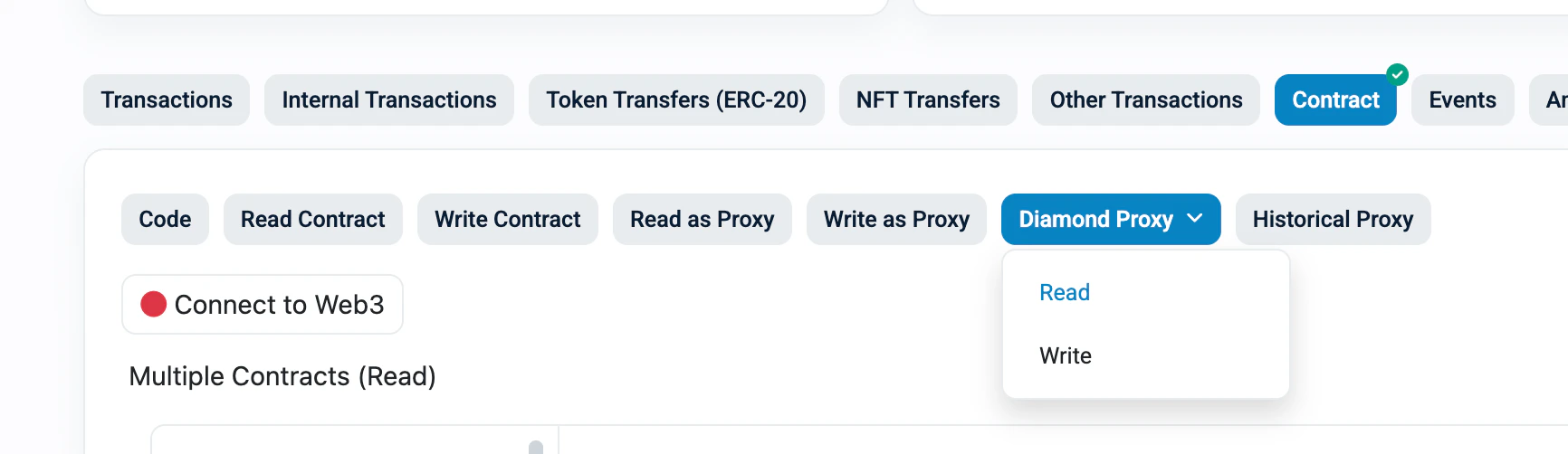
The “Diamond Proxy” dropdown showing Read and Write options: Diamond Proxy dropdown with Read and Write options

Reading data (Diamond Proxy > Read)

  1. Click “Diamond Proxy” > “Read”
  2. On the left sidebar, you’ll see a list of all facets (numbered). Click ViewerFacet for positions, restakers, pairs, and other read functions
  3. The right side shows all functions in that facet
Diamond Proxy Read view — ViewerFacet selected in the left sidebar, showing functions like positions and pairs: Diamond Proxy Read with ViewerFacet sidebar

Writing transactions (Diamond Proxy > Write)

  1. Click “Diamond Proxy” > “Write”
  2. Click “Connect to Web3” to connect your wallet
  3. On the left sidebar, select the correct facet:
ActionFacet to select
UnstakeRestakingFacet
RepayBorrowingFacet
Withdraw CollateralCollateralManagementFacet
Diamond Proxy Write view — RestakingFacet selected in sidebar, showing unstake function with input fields: Diamond Proxy Write with RestakingFacet sidebar
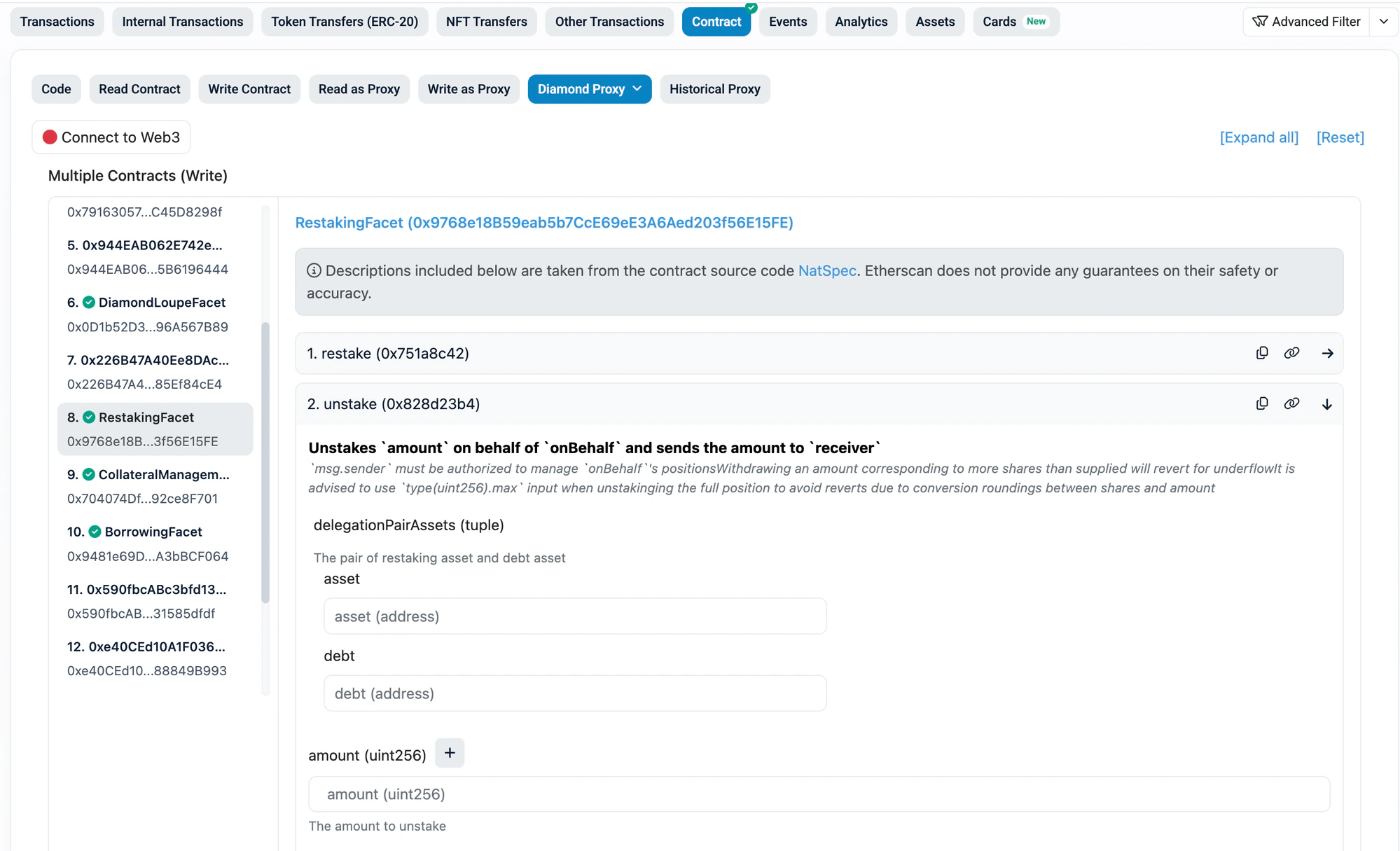
Tip: If you don’t see the function you need, you’re on the wrong facet in the sidebar. Check the table above and click the correct facet name.

1. Find Your Pair ID

Every operation requires a delegationPairId (for restake positions) or pairId (for borrow positions). Find yours from the tables below.

Ethereum — Restake Pools

Asset (aToken)UnderlyingDebtdelegationPairId
aEthUSDCUSDCGHO0x858e80a896e0b166bb915cf23a5422af84da3bd03ba15266bf657e202a706709
aEthUSDCUSDCUSDC0x6f8227c2f15c13d9c9d409c165322ea1fa7815b464a83bb3db97196f6b547acf
aEthWETHWETHWETH0xc95ddaa41f8b052609186ef95d959eeed8e9442460735d56ccc5f2fb9c8c6459

Ethereum — Borrow Pairs

CollateralDebtpairId
hyperUSDCGHO0xc63f980a8c707b1fa3bd5d224ebb1e39461f918075af70e877e650cf165bcdd0
hyperUSDCUSDC0x138691662b8b1b8ab563fe6dc02886254c7042e59b92da0c4e39b0a9a0676031
fUSDCGHO0x298aa6a6ed3c11386efa88a86ddd1aab2f5538ef87265e78ca04203d235da369
fUSDCUSDC0x75af9116d0ec9cb02b0b105eaf57be84e3881668cf2cd2061652e5ad35100035
bbqUSDCGHO0x24263bb59f68725cc3009fbe60ef2defd3ef2115f90ea177ac8a988a034e77df
bbqUSDCUSDC0x784ef0cb8b003a2560dc075d1aa0ad1f2b77c7fb25592ba49e307c1b5f24a32d
resolvUSDCGHO0x59b976403b0f22232c3c51de092212bb1c8f19deae389c245dd64209ad8bb693
resolvUSDCUSDC0xdb9e632142599e0944d6abbd2f12403978125767a6ebaa11c76c5d6deac8b094
USUALUSDC+GHO0x01c0ae13c65f5acd29a9b2965839d60a64db3ddf5021166eeefbdcd47790eb4c
USUALUSDC+USDC0x7ea859e1663ec352f486242a1a6d3b3e49a7f0adbebd3db91c165c3ae9ceeb48
Re7WETHWETH0x4d0d8032c93ce906c251320ddfc684ab1f21d72dfecac3b7895d12aa7927a5cf
mhyETHWETH0x6a2ac2068deeddb301734d68d860d22d7c6d52d082c69385346cabc310bb8ff8
gtLRTcoreWETH0x27b55ecdf7c08e7334dedd57b2d003f1632f659e985257c0e55f878afb50bca7

Sonic — Restake Pools

Asset (aToken)UnderlyingDebtdelegationPairId
aSonUSDCUSDC.eUSDC.e0x4372989400a74c4ee7194806b73722505de0f06b22d6b210e022b5fac29eb641

Sonic — Borrow Pairs

CollateralDebtpairId
wstkscUSDUSDC.e0xeb88af7ca2a4b64c65951fd2fa1b6c0ea571ff03de0da61edd4ef1c2421573ba

Plasma — Restake Pools

Asset (aToken)UnderlyingDebtdelegationPairId
aPlaUSDT0USDT0USDT00x060ffdf07a3de1f85184e3996ffd480d811e95ea141404370b48f81d154f91bd

Plasma — Borrow Pairs

CollateralDebtpairId
246USDT0USDT00x7830cec2536e7ccb563a576b0b0837a87e7d245bd40583d247697c272f1d1dc3
Re7USDT0CoreUSDT00x1562c1aede7b0d4f808fc1078b2b4a638c1202544a34900b7f978130f4a6db30

2. Check Your Positions

  1. Go to the Diamond246 contract on the block explorer for your chain
  2. Click “Diamond Proxy” > “Read”
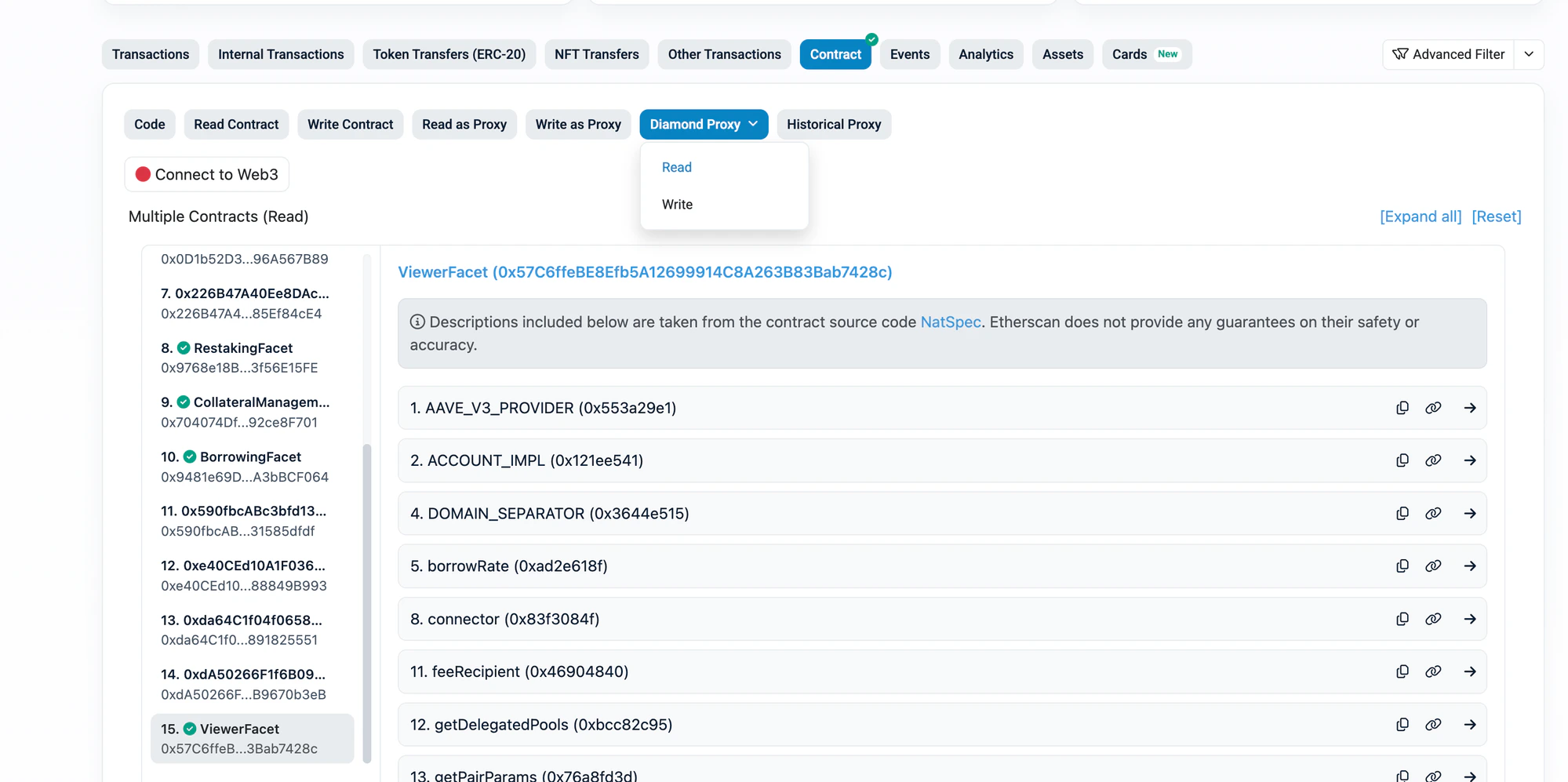
  3. In the left sidebar, click “ViewerFacet”
ViewerFacet selected in sidebar — scroll down to find positions and restakers functions: ViewerFacet showing positions and pairs functions

Check Borrow Position

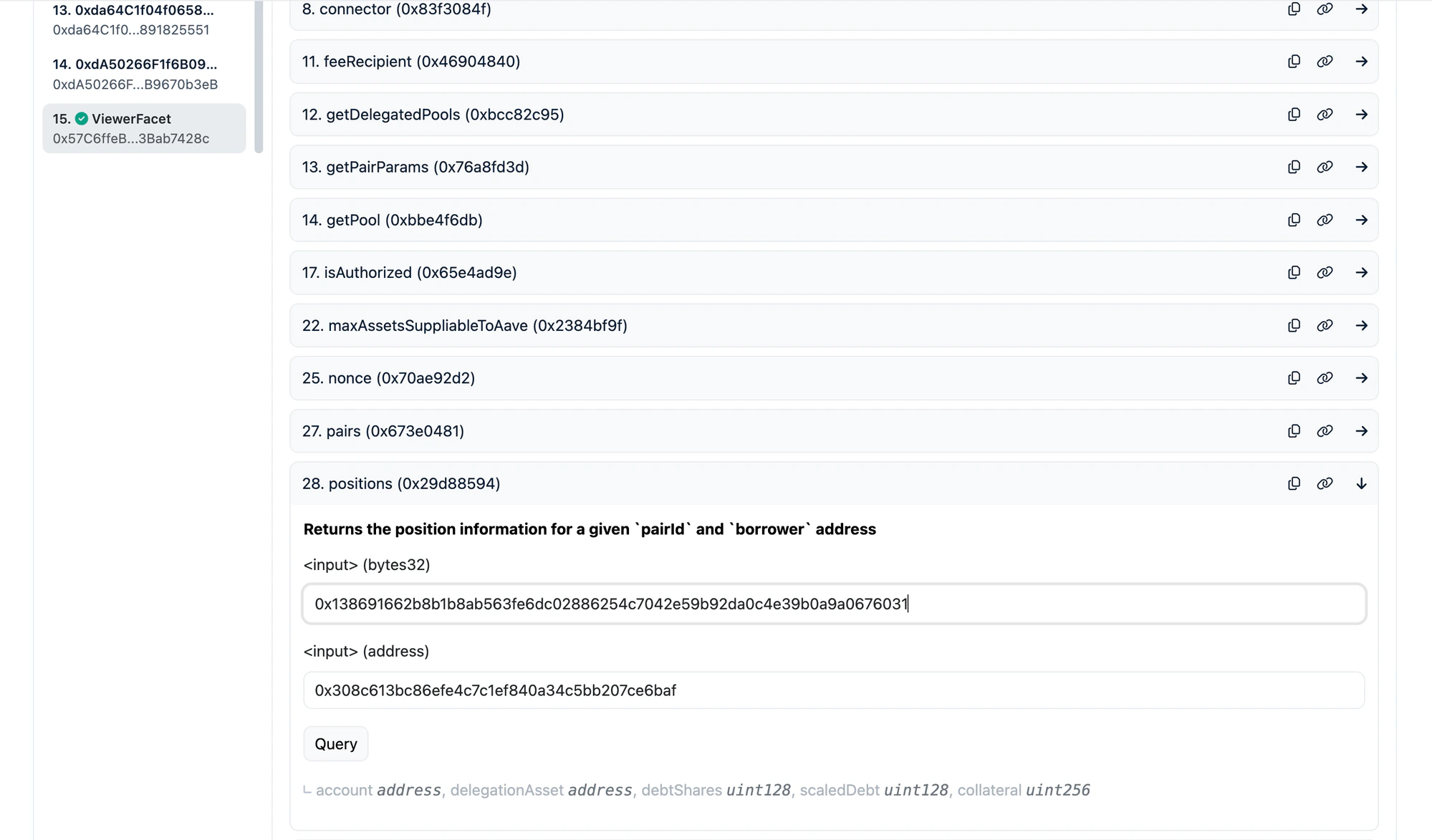
Find and expand the positions function.
ParameterWhat to enter
pairIdYour pair ID from the table above
accountYour wallet address
Click Query. You will see:
FieldMeaning
accountYour proxy account address (used internally)
debtSharesYour share of the debt pool
collateralYour collateral amount (in token’s smallest unit)
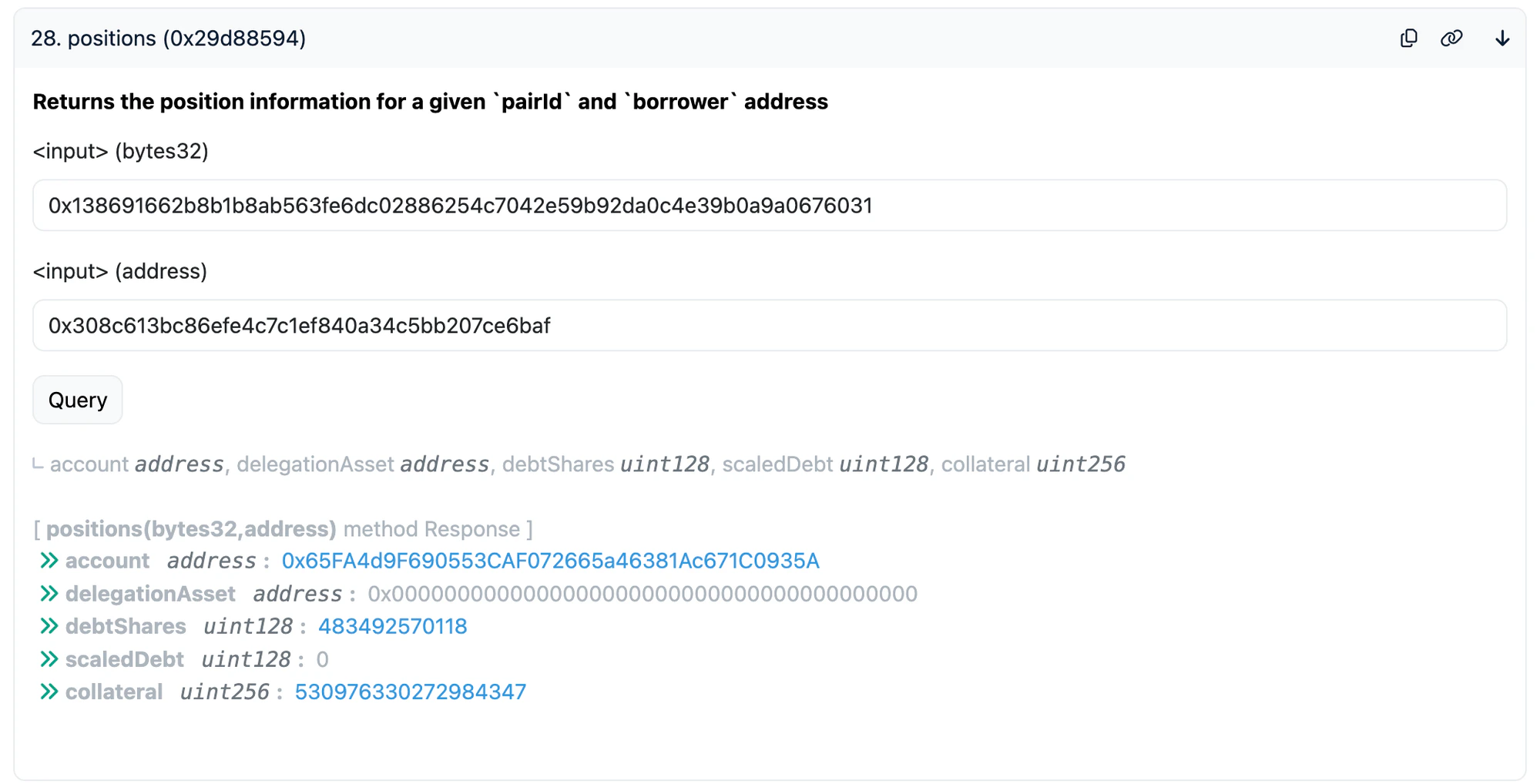
Example: querying the hyperUSDC/USDC pair (0x1386...6031) for address 0x308c...6baf — result shows debtShares, scaledDebt, and collateral: positions query showing debtShares and collateral for hyperUSDC/USDC pair
Check Restake Position

Find and expand the restakers function.
ParameterWhat to enter
delegationPairIdYour delegation pair ID from the table above
accountYour wallet address
Click Query. You will see:
FieldMeaning
scaledSupplyYour restaked amount (scaled — see note below)
interestAccrued interest you can claim
Example: querying the aEthWETH/WETH restake pool (0xc95d...6459) for address 0x08c7...bff5 — result shows scaledSupply and interest: restakers query showing scaledSupply for aEthWETH/WETH pool
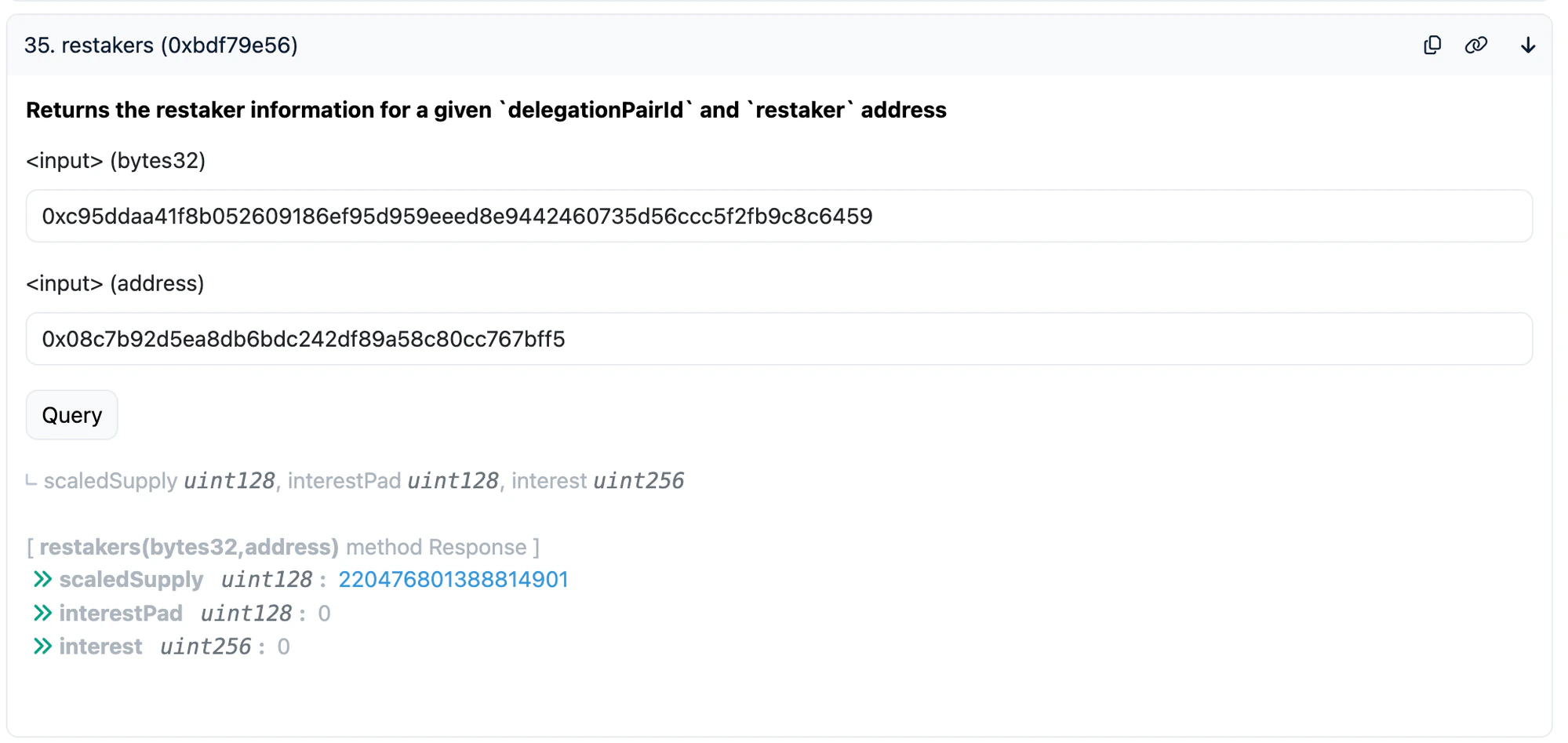
Note: scaledSupply is RAY-scaled (divided by 10^27 with the liquidity index). The actual amount is approximately scaledSupply * liquidityIndex / 10^27.

3. Unstake (Withdraw Restaked Assets)

This withdraws your restaked aTokens (e.g. aEthUSDC, aSonUSDC, aPlaUSDT0) from Diamond246.

Step by Step

  1. Go to Diamond246 on the block explorer
  2. Click “Diamond Proxy” > “Write”
  3. Click “Connect to Web3” and connect your wallet
The “Connect to Web3” button — make sure it shows green (connected) before proceeding: Connect to Web3 button on Write Contract
  1. In the left sidebar, click “RestakingFacet”
  2. Find and expand the unstake function
  3. Fill in the parameters:
ParameterWhat to enter
delegationPairAssets > assetThe aToken address (see table below)
delegationPairAssets > debtThe debt token address (see table below)
amountUse max value for full withdrawal: 115792089237316195423570985008687907853269984665640564039457584007913129639935
onBehalfYour wallet address
receiverYour wallet address
  1. Click Write and confirm in your wallet
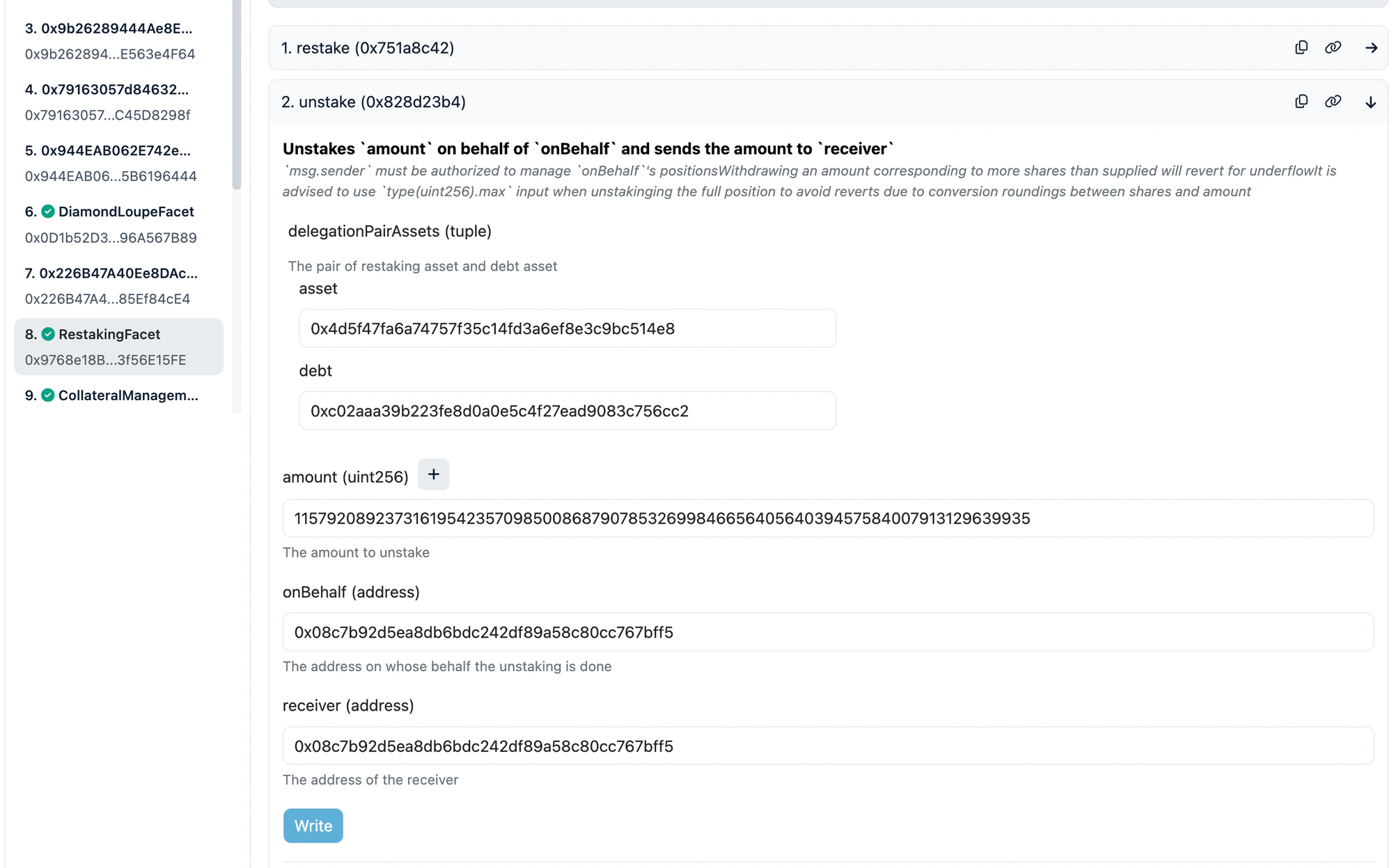
Example: unstaking from the aEthWETH/WETH pool — RestakingFacet selected, unstake expanded with aToken and debt addresses filled, max amount for full withdrawal: unstake function filled for aEthWETH/WETH pool
Token Addresses for unstake

Ethereum

asset (aToken)AddressdebtAddress
aEthUSDC0x98c23e9d8f34fefb1b7bd6a91b7ff122f4e16f5cGHO0x40d16fc0246ad3160ccc09b8d0d3a2cd28ae6c2f
aEthUSDC0x98c23e9d8f34fefb1b7bd6a91b7ff122f4e16f5cUSDC0xa0b86991c6218b36c1d19d4a2e9eb0ce3606eb48
aEthWETH0x4d5f47fa6a74757f35c14fd3a6ef8e3c9bc514e8WETH0xc02aaa39b223fe8d0a0e5c4f27ead9083c756cc2

Sonic

asset (aToken)AddressdebtAddress
aSonUSDC0x578ee1ca3a8e1b54554da1bf7c583506c4cd11c6USDC.e0x29219dd400f2bf60e5a23d13be72b486d4038894

Plasma

asset (aToken)AddressdebtAddress
aPlaUSDT00x5d72a9d9a9510cd8cbdba12ac62593a58930a948USDT00xb8ce59fc3717ada4c02eadf9682a9e934f625ebb

After Unstaking: Withdraw from Aave

After unstaking, you receive the aToken (e.g. aEthUSDC, aSonUSDC, aPlaUSDT0). To get the underlying token (e.g. USDC), withdraw via the Aave UI: app.aave.com — Go to Dashboard > find your supplied asset > click Withdraw > enter max amount > confirm.

3.5. Redeem re-aUSDC (Sonic Only)

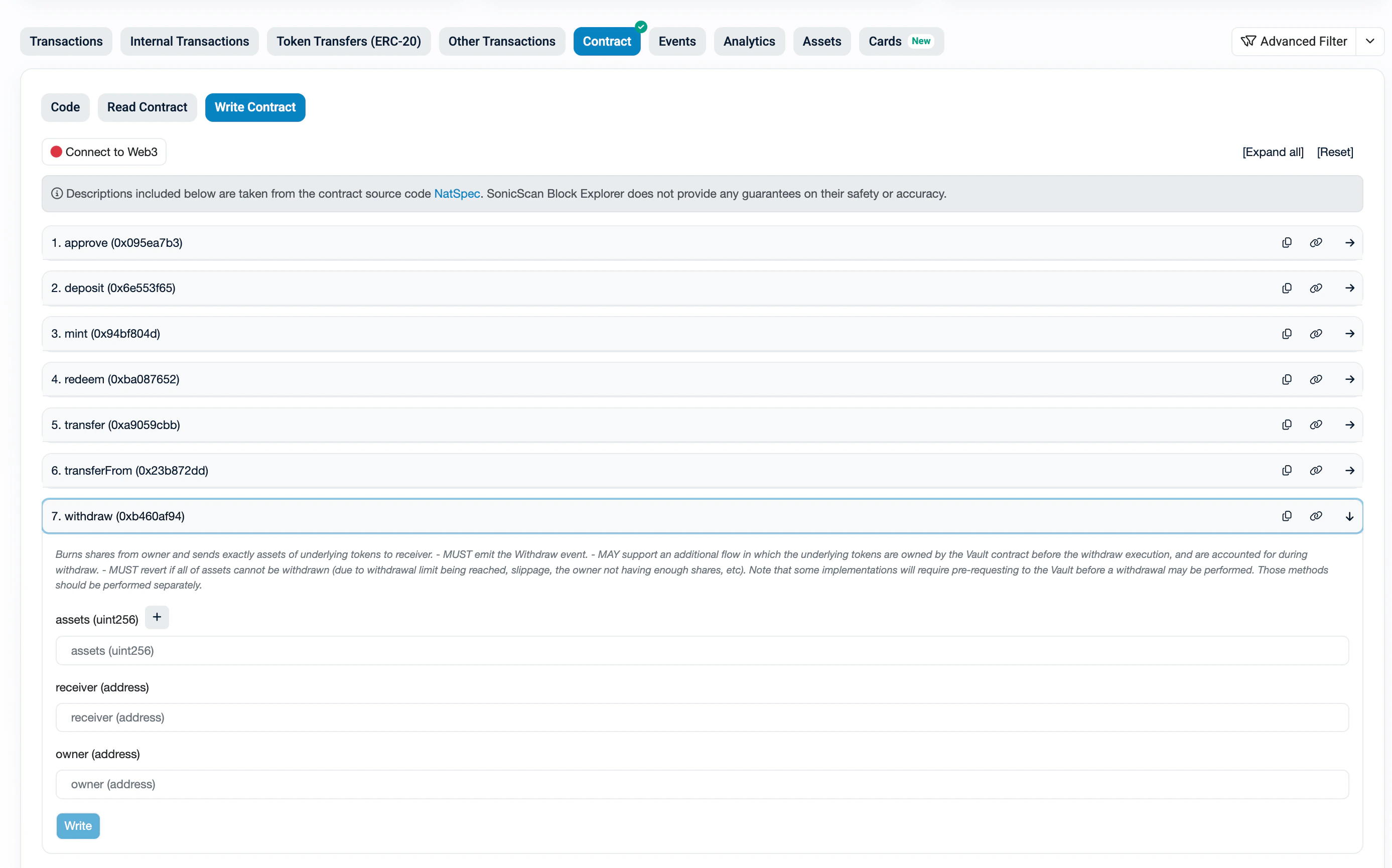
If you hold re-aUSDC on Sonic, you need to redeem it to get back your aSonUSDC (aToken). re-aUSDC Contract: 0x561d1907dd7C0B92E5278356BC230B7e94704d57 re-aUSDC is an ERC4626 vault. Use withdraw to get back an exact amount of aSonUSDC.

Step by Step

  1. Go to the re-aUSDC contract on Sonicscan
  2. Click “Read Contract” > find maxWithdraw > enter your wallet address > click Query
  3. Copy the returned value — this is the maximum aSonUSDC you can withdraw
  4. Switch to the “Write Contract” tab > “Connect to Web3”
  5. Find and expand the withdraw function
  6. Fill in:
ParameterWhat to enter
assetsThe maxWithdraw value from step 3
receiverYour wallet address
ownerYour wallet address
  1. Click Write and confirm
re-aUSDC contract on Sonicscan — withdraw function expanded with assets, receiver, and owner fields: withdraw re-aUSDC on Sonicscan After withdrawing, you will receive aSonUSDC. Then withdraw from Aave (app.aave.com) to get USDC.e.
4. Repay Debt

If you have an outstanding borrow position, you must repay the debt before withdrawing collateral.

How much debt do I owe?

Your debt amount can be calculated from on-chain data:
  1. Go to Diamond246 > “Diamond Proxy” > “Read”
  2. Call positions with your pairId + wallet address — note your debtShares
  3. Call pairs with the same pairId — note totalDebtShares and totalScaledDebt
Your debt ≈ (debtShares × totalScaledDebt) / totalDebtShares
Note: This gives you an approximate amount in the token’s smallest unit (e.g. 6 decimals for USDC, so 100000000 = 100 USDC). The actual debt accrues interest over time, so approve a bit more than this estimate (e.g. add 1%). The repay function only transfers the exact amount owed — any excess stays in your wallet.

Step 1: Approve Diamond246

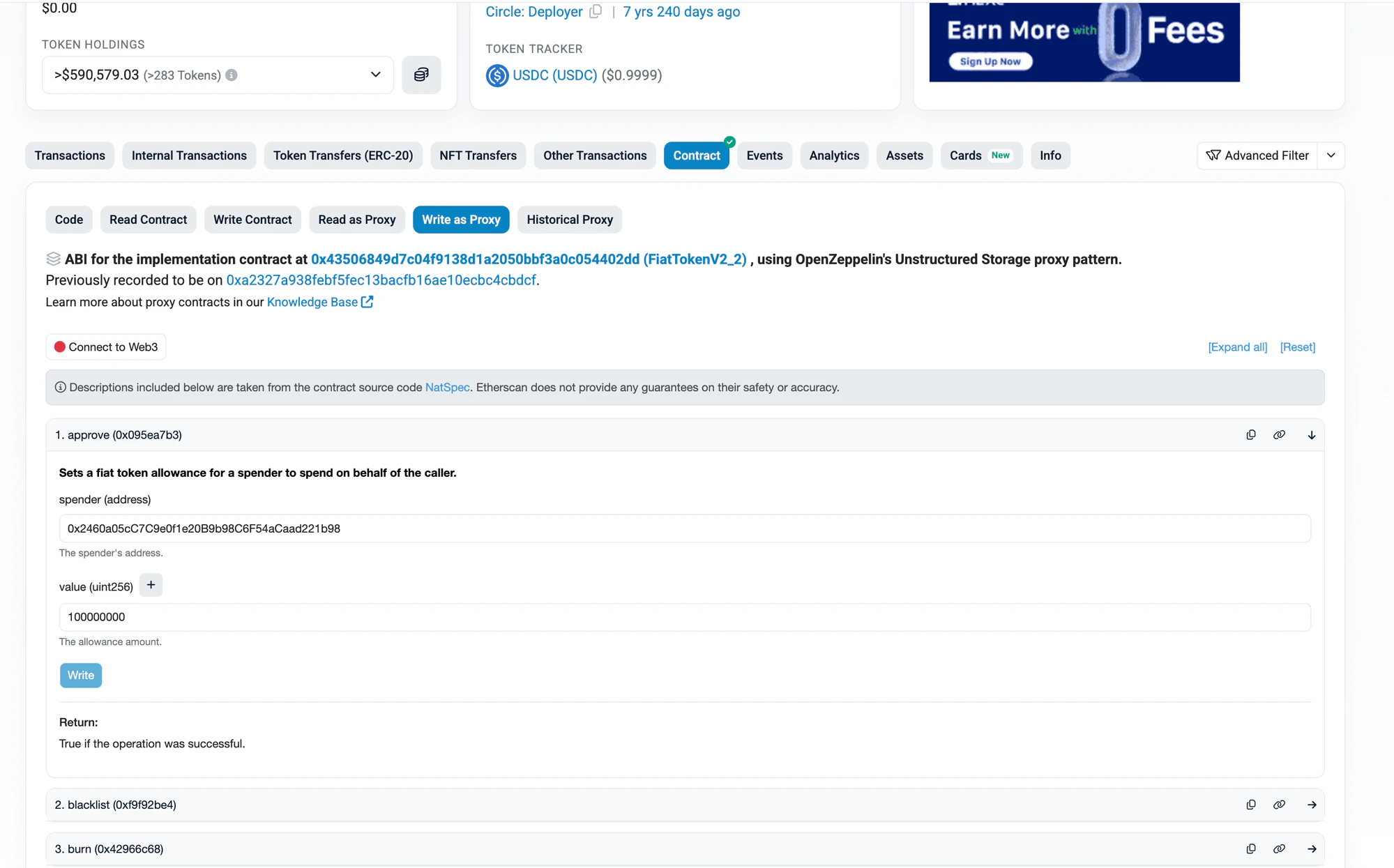
Before repaying, you need to approve Diamond246 to spend your debt token.
Tip: Don’t approve max uint256 if you’re uncomfortable with unlimited approvals. Instead, approve an amount slightly above your estimated debt. The repay function only transfers the exact amount owed — any excess approval is not spent.
  1. Go to the debt token contract on the block explorer (links below)
  2. Click “Write as Proxy” (for proxy tokens like USDC) or “Write Contract”
  3. Click “Connect to Web3”
  4. Find the approve function
  5. Fill in:
ParameterWhat to enter
spender0x2460a05cC7C9e0f1e20B9b98C6F54aCaad221b98 (Diamond246)
amountYour estimated debt amount with buffer (in token’s smallest unit, e.g. for 100 USDC: 100000000)
  1. Click Write and confirm
  2. (Optional) After repaying, you can revoke the approval by calling approve again with amount 0
Example: approving USDC on Etherscan — approve expanded with Diamond246 as spender and 100 USDC (100000000) as value: approve USDC for Diamond246 on Etherscan
Debt Token Contracts

TokenChainAddressExplorer Link
GHOEthereum0x40d16fc0246ad3160ccc09b8d0d3a2cd28ae6c2fEtherscan
USDCEthereum0xa0b86991c6218b36c1d19d4a2e9eb0ce3606eb48Etherscan
WETHEthereum0xc02aaa39b223fe8d0a0e5c4f27ead9083c756cc2Etherscan
USDC.eSonic0x29219dd400f2bf60e5a23d13be72b486d4038894Sonicscan
USDT0Plasma0xb8ce59fc3717ada4c02eadf9682a9e934f625ebbPlasmascan

Step 2: Repay on Diamond246

  1. Go to Diamond246 > “Diamond Proxy” > “Write”
  2. In the left sidebar, click “BorrowingFacet”
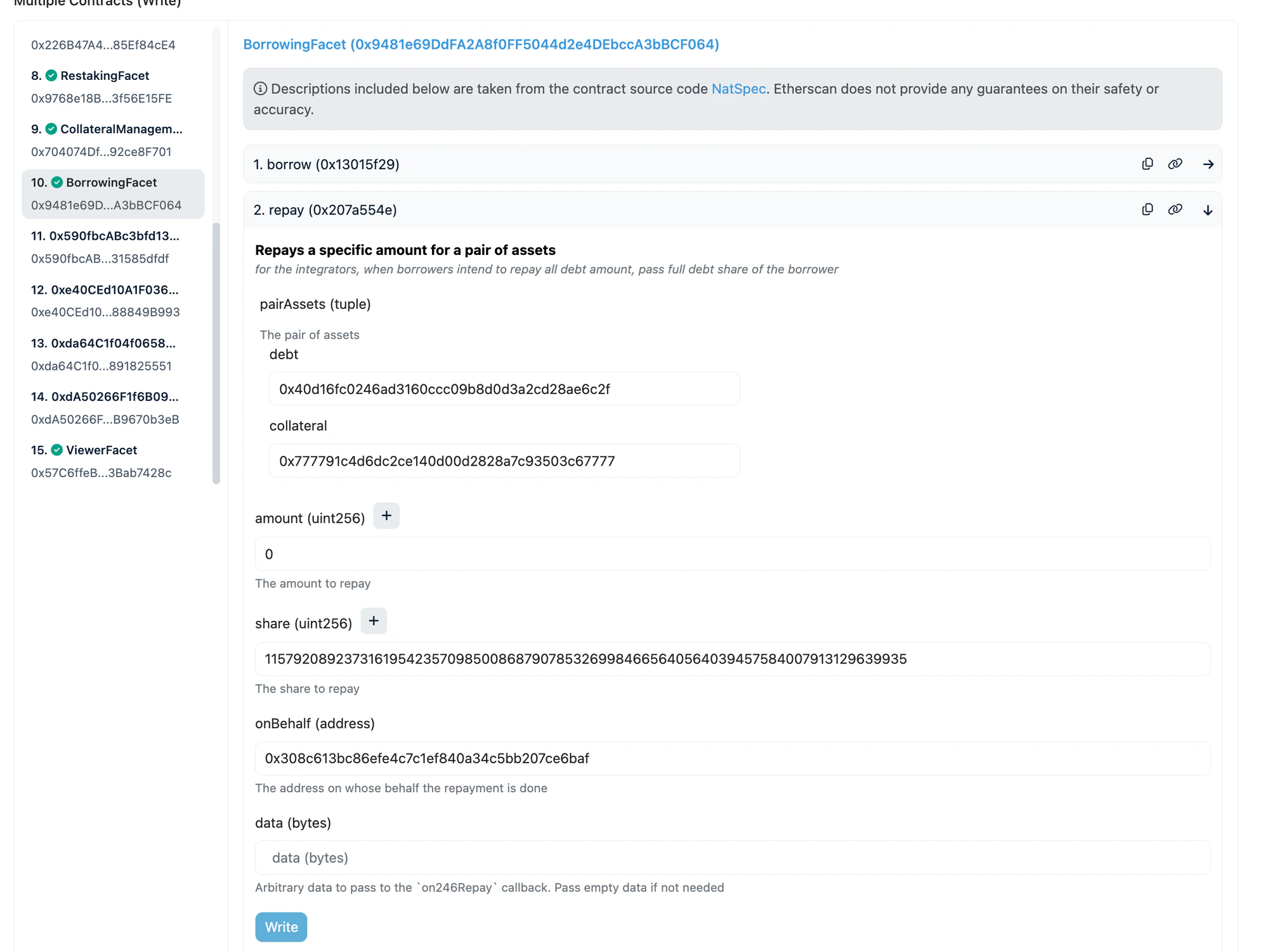
  3. Find and expand the repay function
  4. Fill in:
ParameterWhat to enter
pairAssets > debtDebt token address
pairAssets > collateralCollateral token address
amount0 (use share for full repay)
shareMax uint256: 115792089237316195423570985008687907853269984665640564039457584007913129639935
onBehalfYour wallet address
data0x
  1. Click Write and confirm
Example: repaying on the hyperUSDC/GHO pair — BorrowingFacet selected, repay expanded with GHO as debt (0x40d1...6c2f), hyperUSDC as collateral (0x7777...7777), amount=0 and share=max for full repay: repay function on BorrowingFacet for hyperUSDC/GHO pair
Collateral Token Addresses

TokenChainAddress
hyperUSDCEthereum0x777791c4d6dc2ce140d00d2828a7c93503c67777
fUSDCEthereum0xb0f05e4de970a1aaf77f8c2f823953a367504ba9
bbqUSDCEthereum0xbeefff209270748ddd194831b3fa287a5386f5bc
resolvUSDCEthereum0x132e6c9c33a62d7727cd359b1f51e5b566e485eb
USUALUSDC+Ethereum0xd63070114470f685b75b74d60eec7c1113d33a3d
Re7WETHEthereum0x78fc2c2ed1a4cdb5402365934ae5648adad094d0
mhyETHEthereum0x701907283a57ff77e255c3f1aad790466b8ce4ef
gtLRTcoreEthereum0x4881ef0bf6d2365d3dd6499ccd7532bcdbce0658
wstkscUSDSonic0x9fb76f7ce5fceaa2c42887ff441d46095e494206
246USDT0Plasma0x9c46ee1f01d2b551048f5ff99a4659d98d04bed1
Re7USDT0CorePlasma0xa5eed1615cd883dd6883ca3a385f525e3beb4e79

5. Withdraw Collateral

After repaying all debt, you can withdraw your collateral.
Important: You must repay all debt first. If you have outstanding debt, this transaction will revert.
  1. Go to Diamond246 > “Diamond Proxy” > “Write”
  2. In the left sidebar, click “CollateralManagementFacet”
  3. Find and expand the withdrawCollateral function
  4. Fill in:
ParameterWhat to enter
pairAssets > debtDebt token address (same as repay)
pairAssets > collateralCollateral token address (same as repay)
amountYour exact collateral amount from the positions query (do NOT use max uint256)
onBehalfYour wallet address
receiverYour wallet address
  1. Click Write and confirm
Example: withdrawing collateral from the hyperUSDC/GHO pair — CollateralManagementFacet selected, withdrawCollateral expanded with GHO as debt, hyperUSDC as collateral, exact collateral amount entered: withdrawCollateral on CollateralManagementFacet for hyperUSDC/GHO pair
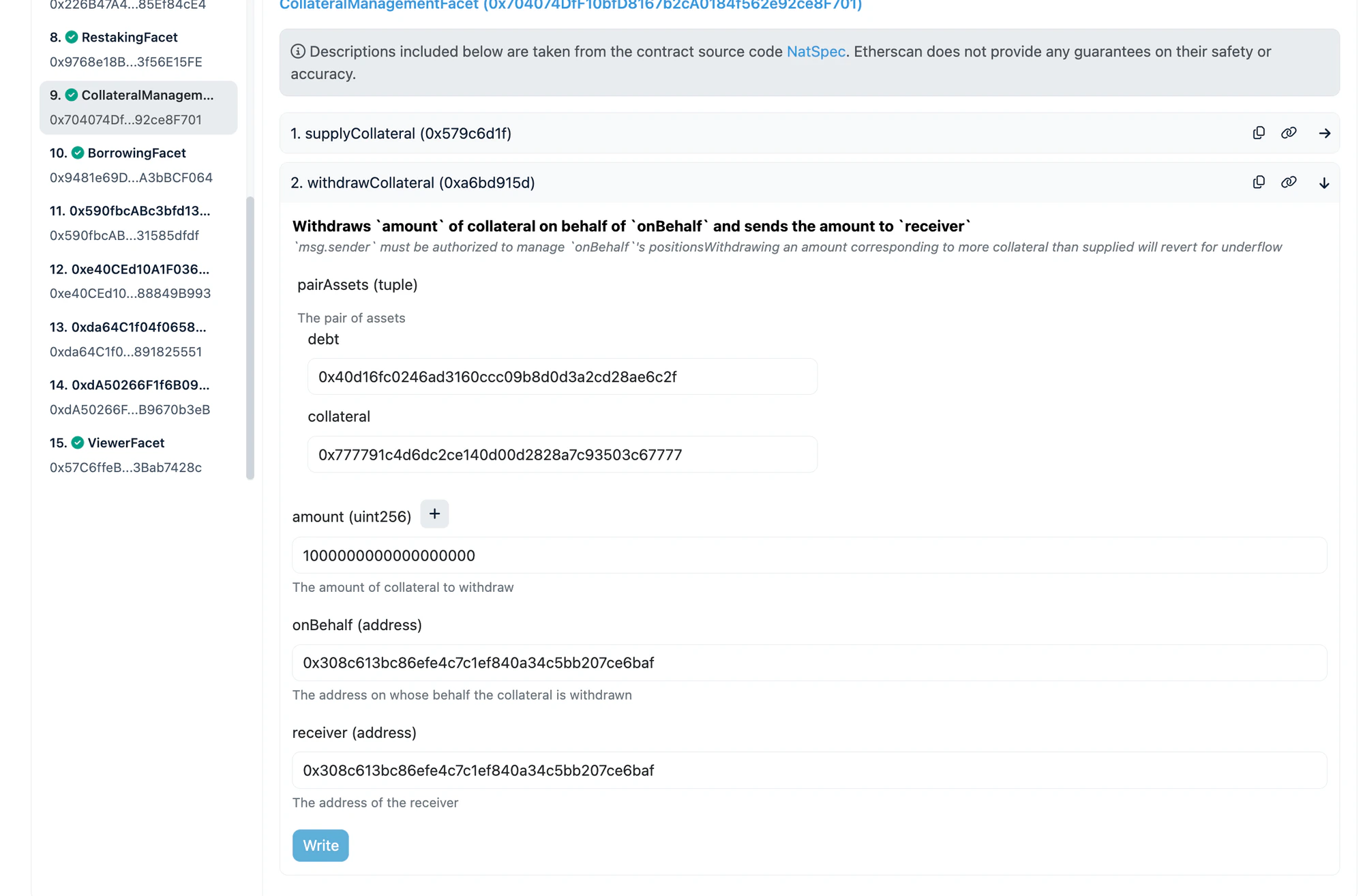
Important: For amount, use the exact collateral value returned by the positions read call in step 2. Do NOT use max uint256 — it will revert.

Quick Reference: Full Exit Flow

Restakers (no borrow position)

  1. Unstake on Diamond246 (RestakingFacet) — receive aToken
  2. Withdraw on Aave UI — receive underlying token (USDC, WETH, etc.)

re-aUSDC holders (Sonic)

  1. Redeem re-aUSDC on Sonicscan — receive aSonUSDC
  2. Withdraw on Aave UI — receive USDC.e

Borrowers

  1. Approve debt token for Diamond246
  2. Repay on Diamond246 (BorrowingFacet) — clear all debt
  3. Withdraw Collateral on Diamond246 (CollateralManagementFacet) — receive collateral token

Borrowers + Restakers

  1. Approve > Repay > Withdraw Collateral (borrower exit)
  2. Unstake > Aave Withdraw (restaker exit)

Need Help?

Join our Telegram group: https://t.me/+m0QLO9DeQKZjZmQ1